 Technical walkthrough · Kommo
How Sales Arena works
Which signal the widget listens to, what it counts as a sale, how the streak and the tier are worked out, what the award window is made of and what you can change in the settings. For people who already got the idea and want the detail.
What the widget does
Sales Arena listens for a single CRM event — a lead moving into the stage you picked — and turns it into an award window for everyone working in the account at that moment. The widget counts the rep’s streak of leads for the period, awards a tier, plays a sound and refreshes the top-5 leaderboard.
It writes nothing into your leads: no notes, no tags, no fields. It only reads stage transitions and the data the window and the leaderboard need.
How the signal travels
Six steps between the stage change and the window on screen.
- The CRM sends a webhook saying the lead changed stage.
- The backend answers
200immediately and puts the event in a queue. Answering fast is mandatory: the CRM disables a webhook that piles up invalid responses. - A worker waits out the delay you set, re-reads the lead and checks the scenario rules.
- It counts the rep’s streak for the current period in your account timezone.
- It publishes the notification; the delivery instances fan it out to open connections.
- The widget shows the window to whoever has the account open right now.
What the widget counts as a sale
The rule lives in the scenario and is entirely yours.
- Pipeline and stage. Usually the won stage, but any stage works — the window fires on every transition into it.
- Movement only. A lead created directly in the won stage is not counted. Otherwise importing a thousand closed leads would rewrite the whole statistic at once.
- Delay — none, 10, 30 or 60 seconds. It gives the CRM time to finish writing the data; if the lead leaves the stage within it, the notification is cancelled.
- Minimum amount. Leads below the threshold are left out of the count. Leave the field empty to count everything.
- Leads with no budget — counted or not. If not, there is no window for them at all.
How the streak is counted
The streak is the number of counted sales a rep made within the period. You choose the period: working day, calendar week, month, quarter or the last N days.
A new period resets the streak: on a new day or month the rep starts again from «First sale». Nothing needs to be set up again for that.
Timezone
Period boundaries are counted in your account timezone, not the server’s. Otherwise a team on the other side of the world would have its week start in the middle of Sunday evening.
Kommo does not expose time settings through the API, so the widget sends the zone itself: the account setting first, then the browser zone. The server accepts it once and only from an admin — a rep travelling abroad has their own zone, and the whole account would travel with them.
The ladder, sound and appearance
There are five tiers, and the thresholds are fixed and identical in every account:
- 1 lead — First sale
- 2 leads — Double
- 3 leads — Combo x3
- 4 leads — Sales machine
- 5 leads — Legend
Between thresholds the base sale window is shown. Tier names arrive in your account language: switch the account to Spanish and the ladder becomes Spanish.
What you pick per tier
- A sound from the library — or silence.
- An appearance effect: «Quiet» (a plain fade), «Slide», «Spring» (an overshoot) and «Stamp» (an impact with a single shockwave). By default the streak tiers arrive on a spring, the top tier on a stamp, and the base sale window keeps the slide: it fires on every single sale, and an impact there would wear thin by the tenth sale of the day.
How the window is built
The window is meant to read as an award screen, not a system message.
- Format — a large window in the centre for a strong event, or a compact card in the corner of the screen.
- Time on screen is configurable; the window closes itself or by hand.
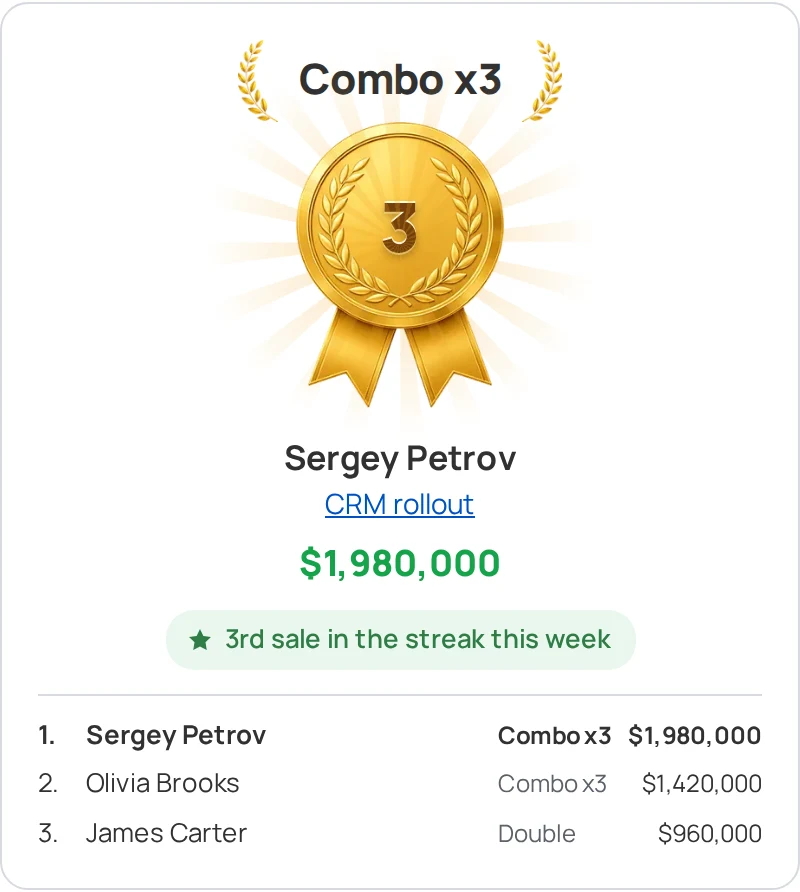
- Inside — the tier, a medal carrying the streak number, the rep’s name, the lead name as a link, the amount, a reason line («3rd sale in the streak this week») and the current top-5.
- If several events land at once, they are shown one after another, not stacked.
Sound
Each person mutes the sound or changes the volume for themselves — it does not affect anyone else. Browsers refuse to play sound before the user acts on the page, so a short prompt appears in the account: any click anywhere clears it, not only a click on the prompt.
Who gets the notification
- The whole active team — a shared arena: everyone sees the win.
- The lead owner only — quiet mode: the window goes to whoever owns the lead and distracts nobody else.
- Selected people — the sales team and the head, for example.
There is no cap on recipients on any plan. The window reaches those who have the account open at that moment.
Your own windows on any stage
Besides sales, the widget can show a window of your own on any stage of any pipeline — when a lead reaches approval, say, or a large request comes in.
- The trigger — a lead created, or moved into the stage.
- You set the name, the pipeline and stage, the sound, an icon from the library, whether to show the owner’s name and who sees it.
- Separate switches add a laurel by the title, the streak number in the centre of the medal and confetti. They are off by default: a message window celebrates only if you asked it to.
- «Show after Legend» — sales beyond the top tier show the base window by default; such a window can take them over.
Guards against extra windows
- Deduplication. Webhook delivery is at-least-once, and one event can arrive several times. A repeat does not produce a second window.
- Lead moved back. If the lead leaves the stage during the delay, the notification is cancelled.
- Bulk operations. Windows are paused during a mass stage change — otherwise moving a hundred leads would mean a hundred windows.
- Owner changed. Whoever owns the lead at the moment it fires is the one counted.
Permissions, requirements and plans
What the widget does with your data
It reads only: stage transitions and the fields the window and leaderboard need — the owner, the lead name, the amount. It creates no notes, adds no tags, changes no fields. The lead history stays exactly as your rep keeps it.
What the CRM plan must allow
The widget receives events through webhooks, so you need a Kommo plan where webhooks are available. It checks this during installation and shows a clear message if the current plan does not support them.
What the plans include
- Free — the base sale window, one scenario and one pipeline, unlimited recipients, day / week / month periods, one sound.
- PRO — streak counting with every tier and the top-5, unlimited scenarios and pipelines, custom windows, quarter and last N days, the sound library, a 30-day event log.
The first 14 days include every PRO feature and need no card. After the trial the account is not switched off — it moves to the free plan: nothing is deleted, the extras are simply paused.
The log
On PRO the widget keeps a log: what fired, who saw it and where in the streak the event sat. It is about reviewing what was counted — which is why the free plan, where nothing is counted, has no log either.
Installation
- 1Press the install button or find «Sales Arena» in the Kommo marketplace.
- 2Authorise the widget — grant access to your account.
- 3Open the advanced settings. The first-run wizard offers a profile matching your sales cycle and fills the scenario in for you: pipeline, stage, period and ladder. All of it can be changed afterwards.
Other integrations
All integrations >RegionTime: client local time
The client’s local time, region and time zone from the phone number — with DST, weekends and holidays.
Advanced Fields
Group fields, turn toggles into convenient controls, add measurement units.
Peresmenka
Manager shift management and automatic deal distribution. Even workload, real-time stats.
Mass Lead Creator
Bulk-creates deals for calling from selected contacts. Tasks scheduled within working hours.
Workspace Diagnostics
Automatic CRM health audit: pipelines, deals, tasks, activity — with AI recommendations.
Questions about the integration?
Leave a request — we'll help with installation, setup, and picking the right widgets for your Kommo CRM process.
on messengers