I
★★★★★
Ilya SavsyukKommo Marketplace
«The best widget for managing lead distribution. Thanks to the developers — always in touch.»
Peresmenka $20 / mo · Kommo CRM
Manages manager shifts and automatically distributes incoming deals — even workload and real-time statistics.
Peresmenka: Shift Manager solves a key problem for sales teams: when a manager goes off shift, their leads get stuck without a responsible person. Clients wait, conversion drops.
The widget automatically tracks which managers are currently on shift and routes incoming leads only to those who are online. When a manager goes off shift, their active leads are instantly reassigned to colleagues.
The widget operates in two loops: shift tracking and lead distribution.
Each manager can be in one of three states:
When a new lead arrives in the CRM, the widget determines which managers in the group are currently online and assigns the lead to the least loaded one. If everyone is offline, the lead remains unassigned until someone starts their shift.
When a manager ends their shift, all their active leads (in tracked statuses) are transferred to colleagues who remain on shift. Distribution is balanced — each manager's current workload is taken into account.
The first setting determines how managers start and end their shifts.
| Mode | Description |
|---|---|
| Manual | The manager clicks "Start Shift" / "End Shift" in the Kommo interface. Full control. |
| Automatic | The shift starts automatically when CRM activity is detected (page opens, actions). Ends after an inactivity timeout. |
| Hybrid | The shift starts automatically, but the manager can manually end it or go on pause. |
Here you define who participates in distribution and in which pipelines/statuses.
Select manager groups from the Kommo group list. Only users in the selected groups participate in the shift and distribution system.
For each selected group, specify which pipelines and statuses the distribution applies to. You can select an entire pipeline or individual statuses.
Two options for enabling distribution:
The time range during which new lead distribution is active. Outside this range, incoming leads are not distributed. Default: 09:00 — 18:00.
Time in minutes after shift start during which the manager does not receive new leads. Useful to give the manager time to get up to speed.
Time in minutes after which an inactive manager is automatically set to pause. While paused, the manager does not receive new leads, but their current leads are not redistributed.
Settings for when a manager goes off shift and their leads need to be transferred to colleagues.
The time range during which redistribution is active. Outside this range, the departing manager's leads are not moved.
Time in minutes after a manager goes off shift before redistribution begins. Useful if the manager might quickly return (brief connection loss).
Time in minutes after which an offline manager's leads are transferred to colleagues on shift. If left empty, the transfer happens immediately.
Select a custom lead field. If this field is filled in, the lead is excluded from distribution and redistribution. Useful for VIP leads or leads under direct management oversight.
If enabled, when a manager starts their shift, their "original" leads that were redistributed during their absence are returned to them.
If enabled, a note is automatically added to the lead for each distribution, redistribution, or return event. Useful for auditing and oversight.
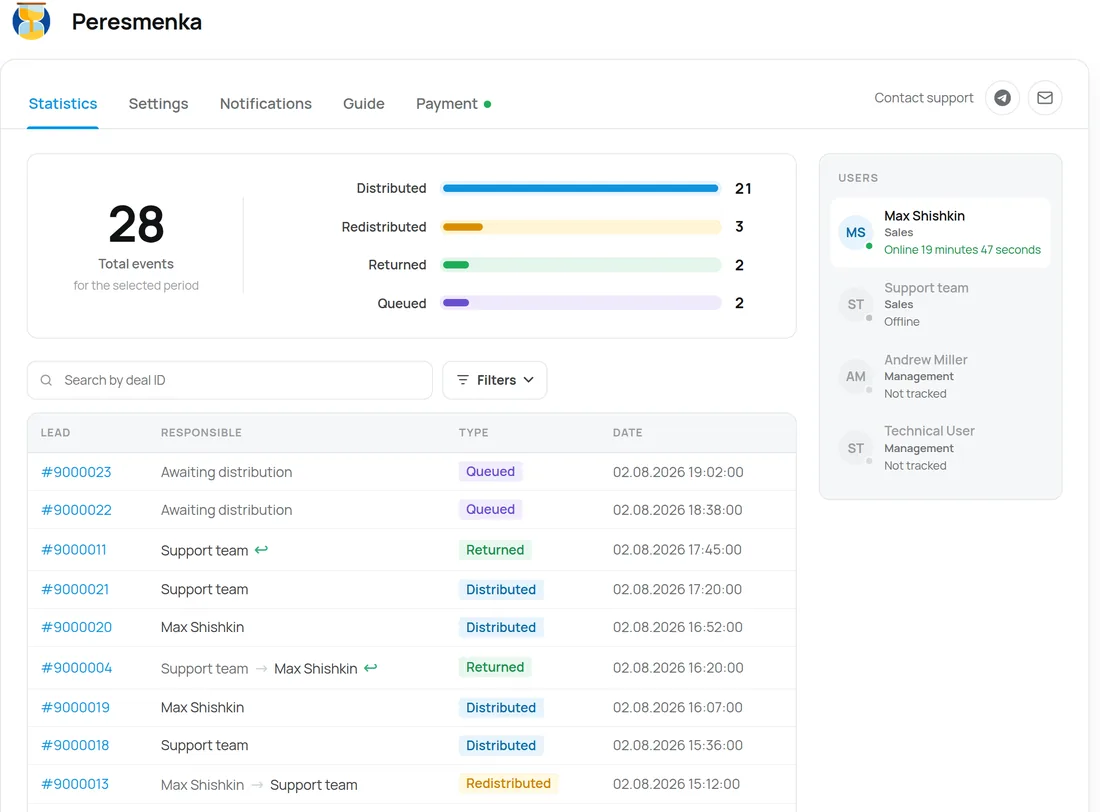
The "Statistics" tab provides complete information about the system's operation:
Real ratings of our widgets on the Kommo Marketplace — published as is.
«The best widget for managing lead distribution. Thanks to the developers — always in touch.»
PeresmenkaThe client’s local time, region and time zone from the phone number — with DST, weekends and holidays.
Group fields, turn toggles into convenient controls, add measurement units.
Bulk-creates deals for calling from selected contacts. Tasks scheduled within working hours.
Tracks response time to new deals. Preventive alerts, end-of-day report and tasks.
Automatic CRM health audit: pipelines, deals, tasks, activity — with AI recommendations.
Leave a request — we'll help with installation, setup, and picking the right widgets for your Kommo CRM process.