Do not call a client when it is night there
RegionTime works out the local time from the phone number and shows it right in the CRM card — next to the number, before the manager hits Call.
It accounts for the time zone, daylight saving, weekends and public holidays.
Free plan forever · PRO included for 14 days · no card needed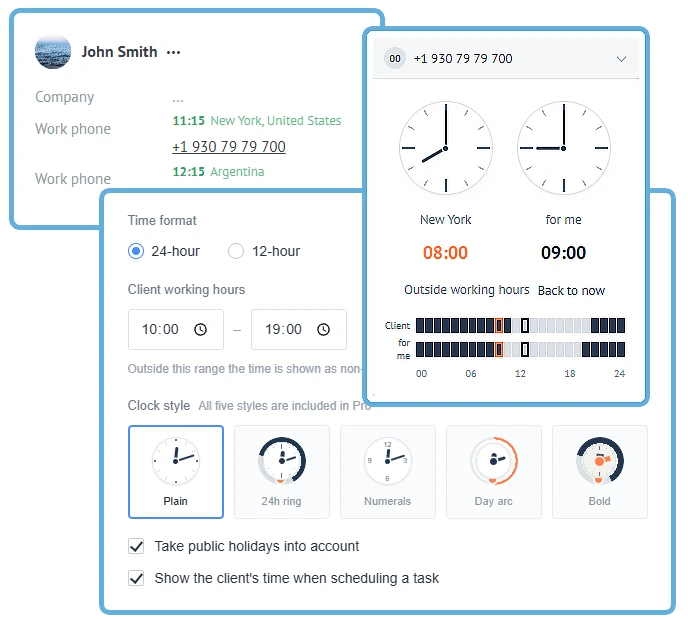
One CRM, and every client on a different clock
When it is 15:00 for the manager, it can be 09:00 for one client, 18:00 for another and already 02:00 at night for a third.
The CRM shows your account time. To pick a decent moment to call, a manager has to place the number, recall the time zone, work out the difference and remember daylight saving.
Usually the manager does none of that. They just call.
RegionTime removes the arithmetic: the client’s local time is already next to their number.
The time shows up where the decision is made
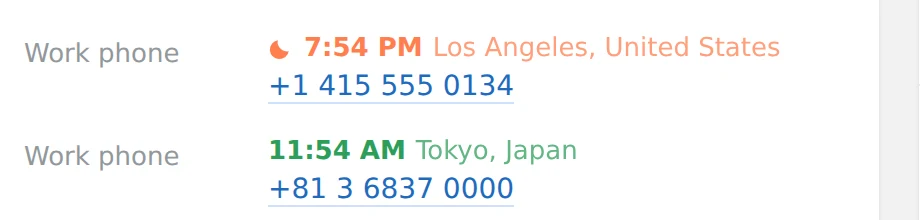
Local time above the phone number
The manager sees the local time, the region and whether the working day is on — right beside the number they are about to dial.
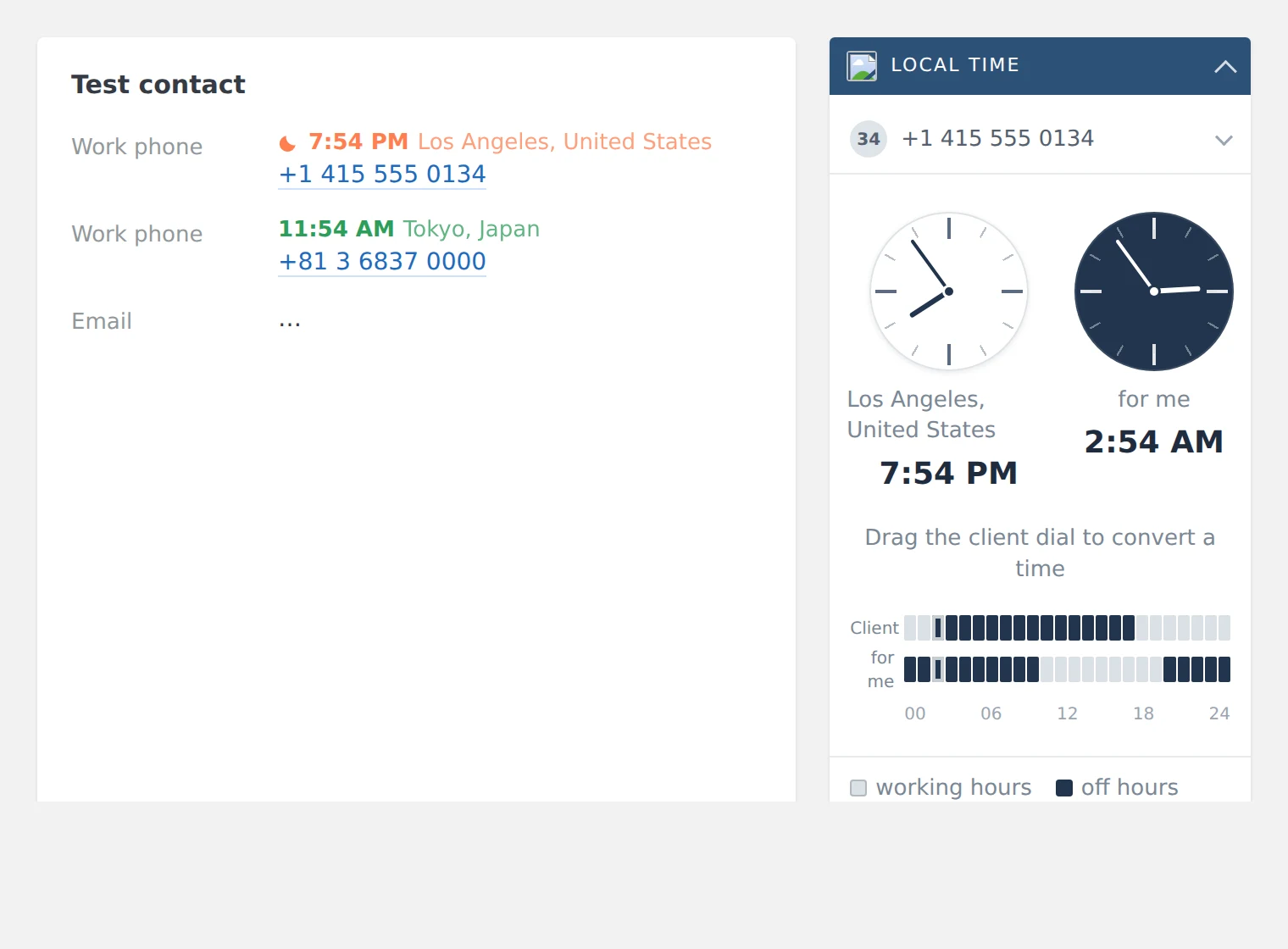
Two clocks in the card
The client’s time and yours side by side. Below them, where the working hours overlap.
Recalculated when a task is set
The CRM shows what the chosen slot will be for the client.
Fields for the CRM and integrations
Time zone, region and country can be written into lead, contact or company fields.
It does not just add a few hours
Working from the country alone gets it wrong often. Large countries span several zones, daylight saving starts on different dates, and the weekend is not everywhere Saturday and Sunday.
Daylight saving
RegionTime uses the IANA time-zone database and works out the offset for the specific date.
Several zones inside one country
Russia, the US, Brazil, Australia, Mexico and others are resolved by the region of the number, not by a country average.
Weekends and holidays
The widget accounts for local weekends and the public holidays of the client’s country.
When the number does not say enough
Where the region cannot be pinned down, the widget marks the answer as approximate. The zone can be corrected by hand.
If the client has moved or carries a SIM from another region, the manual correction always outranks automatic detection.
Free for managers. PRO for automation
The free plan shows the time to a person. PRO passes working hours on to bots, campaigns and the rest of your automation.
Free
- Time and region above every number
- A card block with two clocks
- Time recalculated when a task is set
- Fields: time zone, region, country
- Daylight saving
- Weekends and holidays
- Manual time-zone correction
PRO is available for 14 days so you can try it
PRO
- Everything in the free plan
- The “Client working hours” field
- The field is kept up to date automatically
- Filter contacts by working hours
- Conditions for Salesbot and integrations
- Campaigns held back from the night
- Five clock styles
The price is per account and does not depend on how many managers you have.
When the trial ends the account stays on the free plan unless PRO has been paid for.
Automation needs to know what time it is for the client too
On PRO, RegionTime maintains a “Client working hours” field in the CRM. It flips by itself when the working day starts and ends in the client’s region.
Do not send campaigns at night
Exclude clients whose local time is outside working hours.
Run the bot in daylight only
Use the RegionTime field as a condition in Salesbot or an integration.
Build a call list
Show the manager only the clients who can be called right now.
Hold messages until morning
Resume automatic contact when the client’s working day begins.
The free plan helps managers. PRO puts local time into your business processes.
You can find out the time without RegionTime. The question is how many steps it takes
| Method | Next to the number | Daylight saving | Several zones per country | Available to bots |
|---|---|---|---|---|
| Work it out by hand | no | up to the manager | up to the manager | no |
| Fill a CRM field by hand | no | no | manually | yes |
| An ordinary clock widget | yes | not always | not always | no |
| RegionTime | yes | yes | yes | yes, on PRO |
RegionTime does not merely let you find out the client’s time. It shows it automatically, in the right card, at the moment the manager is about to call.
Works immediately. Adjustable if you need it
- 1
Client working hours
The window outside which the time reads as non-working. 10:00–19:00 by default.
- 2
12- or 24-hour format
The same everywhere the widget prints a clock.
- 3
Where to create fields
Lead, contact, company — separately, or nowhere at all.
- 4
Whether to count holidays
The client country’s calendar can be left out.
- 5
The hint in the planner
Show the client’s time when scheduling a task, or stay out of the way.
FAQ
Where does RegionTime get the time zone?
What if the client has moved?
Is daylight saving accounted for?
Are weekends and holidays accounted for?
What does RegionTime change in the CRM card?
What is the difference between the free plan and PRO?
Install RegionTime and open any card with a foreign or long-distance number
The local time will appear next to the number straight away. The free plan stays free forever.
PRO included for 14 days · no card · Kommo