 Free integration · Kommo CRM
Workspace Diagnostics
Automatic Kommo CRM health audit: pipelines, deals, tasks and team activity — with clear, AI-backed recommendations.
How It Works
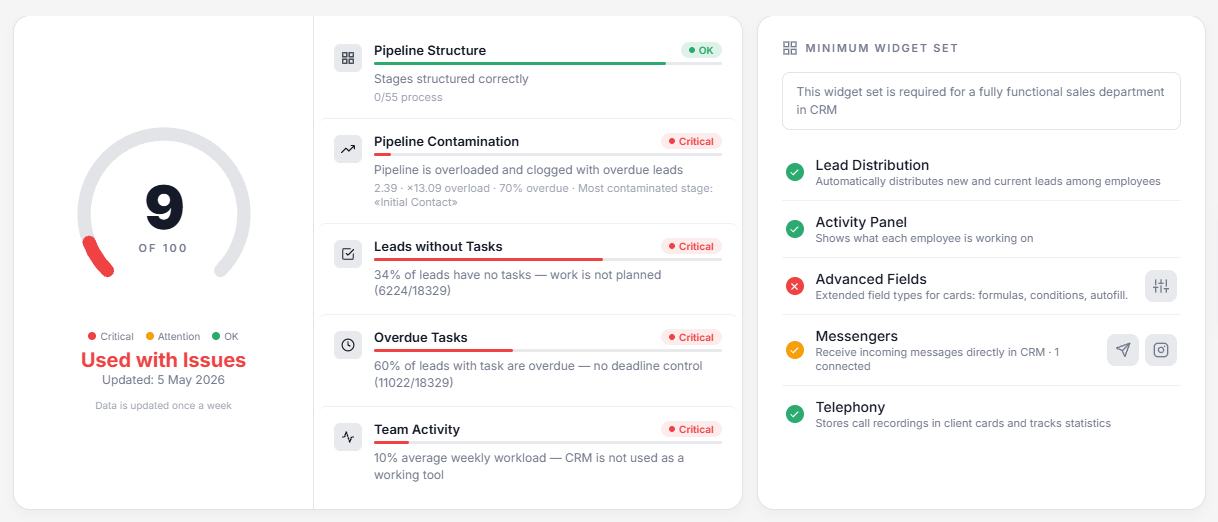
Workspace Diagnostics automatically analyzes your Kommo CRM workspace and generates a comprehensive health report with an overall score, detailed metrics, and AI-powered recommendations.
- Install the widget from the Kommo marketplace — it's free.
- Activate — click the gear icon next to the widget name and press "Activate".
- Get your report — open "Diagnostics" in the settings menu. The system collects data, runs analysis, and generates AI recommendations in about 10 seconds.
- Automatic updates — the report refreshes once a week. No manual action needed.
What We Analyze
The widget evaluates 5 key areas of your CRM workspace:
Pipeline Structure
Checks whether your pipeline stages are properly configured or still using Kommo defaults. Detects "process-type" stage names (like "In Progress", "Thinking") vs. "result-type" names (like "Proposal Sent", "Contract Signed") — result-type stages are better for managing leads.
Pipeline Contamination
Measures how "clogged" your pipeline is. The formula combines overload (actual leads vs. team capacity) with overdue ratio (leads stuck for over 14 days). Identifies the most contaminated stage where leads get stuck.
Leads without Tasks
Percentage of active leads that have no scheduled tasks. A lead without a task means no one has planned the next step — it's likely forgotten.
Overdue Tasks
Percentage of tasks past their deadline. High overdue rate means broken discipline — managers aren't following through on their commitments.
Team Activity
Uses data from the Activity Panel widget to measure average team workload. Shows whether the team is actually working in CRM or just has it open in a tab.
Scoring System
Each metric is scored on a 4-level scale:
| Status | Meaning |
|---|---|
| Green | OK — this area is working properly |
| Yellow | Attention — needs improvement |
| Red | Critical — immediate action required |
| Gray | Inactive — not enough data to measure |
The overall score (0–100) starts at 100 and subtracts penalties for each problem area. The biggest penalties come from leads without tasks, pipeline contamination, and low team activity.
Grades
| Grade | Meaning |
|---|---|
| Not Configured | Default pipeline, no customization |
| Partially Configured | Pipeline has structural issues |
| Configured but Not Used | Pipeline is set up but no lead flow |
| Configured with Issues | Working but with discipline problems |
| Configured Properly | Everything works as it should |
AI Recommendations
After analyzing all metrics, the AI generates a personalized report with:
- Diagnosis — the main problem in 1-2 sentences
- Impact — what it means for your sales
- Action steps — 3 prioritized steps to fix the issues
- Expected result — what to expect after implementing the steps
Widget Checklist
The report includes a checklist of essential widgets for a fully functional sales department:
- Lead Distribution — automatically assigns incoming leads among managers
- Activity Panel — shows what each team member is working on in real time
- Advanced Fields — extended field types: formulas, conditions, autofill
- Messengers — WhatsApp, Telegram, Instagram — receive messages directly in CRM
- Telephony — call recording and statistics per manager
Missing widgets are highlighted with install links — one click to add them to your workspace.
Installation
- 1Click the install button or find “Workspace Diagnostics” in the Kommo marketplace.
- 2Authorize the widget — grant access to your Kommo account.
- 3Open the widget in your Kommo “Settings” and click “Activate”.
Other integrations
All integrations >RegionTime: client local time
The client’s local time, region and time zone from the phone number — with DST, weekends and holidays.
Advanced Fields
Group fields, turn toggles into convenient controls, add measurement units.
Peresmenka
Manager shift management and automatic deal distribution. Even workload, real-time stats.
Mass Lead Creator
Bulk-creates deals for calling from selected contacts. Tasks scheduled within working hours.
SLA: First Touch Control
Tracks response time to new deals. Preventive alerts, end-of-day report and tasks.
Questions about the integration?
Leave a request — we'll help with installation, setup, and picking the right widgets for your Kommo CRM process.
on messengers