Your lead bought from a competitor
while your rep was still typing
“Hey, how’s it going…”
You can’t prevent losses you can’t see.
Control the risk of losing a client in real time.
Which client-loss risks are you not controlling right now?
Most lost clients are no surprise. They are preceded by signals your standard CRM never shows you.
Response speed stays invisible
Your CRM only logs the fact that a reply happened. But the client judges not the reply itself, but how long they had to wait. As long as that time is measured nowhere, the risk of losing the client builds up unnoticed.
The average hides the real problems
10 leads got no reply, 5 waited a full day, the rest were answered within minutes. The average looks fine, even though some of those clients are already lost.
You find out too late
You usually learn about a breach only after the client is gone: from complaints, negative reviews, or falling sales. By then there is nothing you can do.
A growing team means less visibility
With three reps, you can see everything without reports. As the team grows, the manager loses track of who replies on time and who creates the risk of losing clients every single day.
The cost of these risks was calculated long ago
Independent studies all show the same thing: first-reply speed directly affects the probability of a sale.
higher chance of qualifying a lead if you reply within 5 minutes instead of 30
This is not a marketing promise. It is the result of studying tens of thousands of companies and millions of inquiries.
Risk costs money.
Controlling risk wins the sales back.
How risk control works
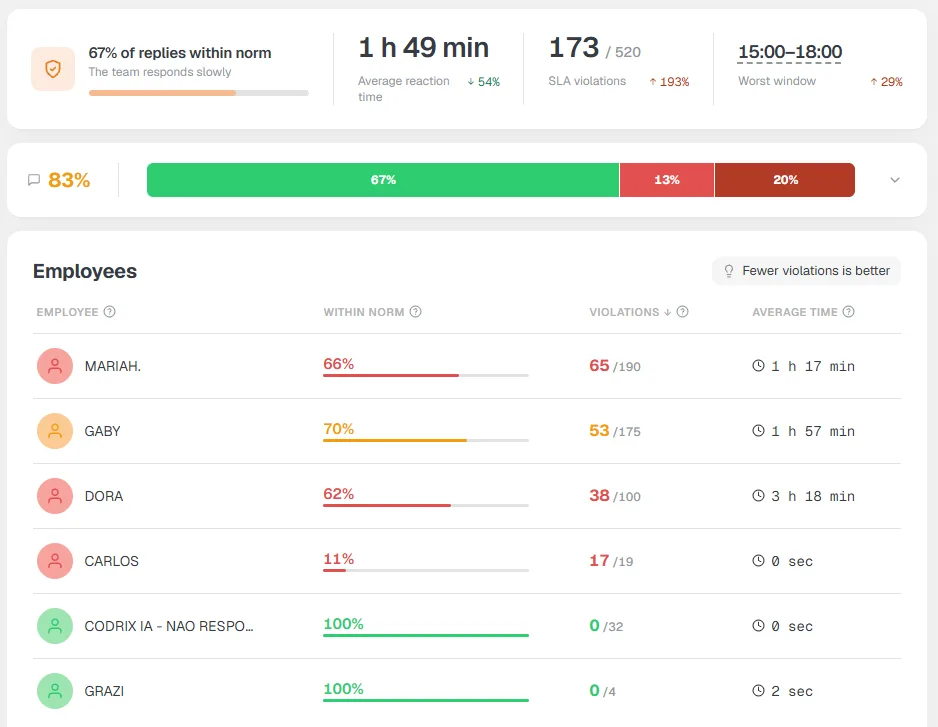
The widget turns first-reply speed into a measurable metric. The manager sees the risk right away, not after a sale is already lost.
An honest first-reply timer
Time is measured for every new lead, factoring in your working schedule. No blended averages that paper over the truth.
A warning before the SLA is breached
The system flags the risk of a breach in advance. While the client is still waiting, the rep has time to reply.
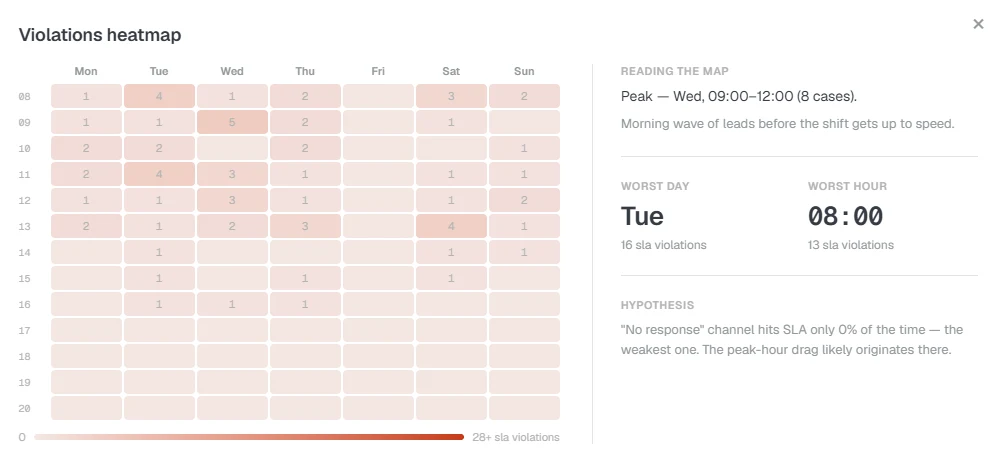
A risk map of your sales team
A clear map and KPIs show where and when your team breaches the SLA most often.
An automatic response to critical risk
On a serious breach, the system creates a task for the responsible rep. The problem will not go unnoticed.
You can’t prevent a risk you don’t control.
The SLA widget vs. verbal reports and standard CRM stats
There are different ways to control first-reply speed. The difference is in what you actually see and when you find out about the problem.
| Verbal reports & standups | Manual checks | Standard CRM reports | SLA: First Touch Control | |
|---|---|---|---|---|
| Real-time data | ||||
| Counts business hours | ||||
| Warns before the breach | ||||
| The “average” does not distort the picture | ||||
| No manual checks needed | ||||
| Task for the owner on a critical breach |
These are not our numbers, they are research
First-reply speed has been studied for over a decade. The conclusions have not changed. The only thing that changed is that you no longer have to measure it by hand.
“Calling back within 5 minutes instead of 30 makes you 21× more likely to qualify a lead and 100× more likely to simply get through.”
“55% of companies do not reply to a lead even within 5 business days. Only 7% manage to reply within 5 minutes.”
Costs less than a single lost lead
Monthly
billed every month
Annual
one payment per year
Save 15%You pick your plan after installing, inside the widget. No payment now.
Frequently asked questions
Is this pressure on the sales team?
How is this better than Kommo’s built-in reports?
Do nights and weekends count?
Is it hard to roll out?
What happens after the trial?
How soon will I see results?
Turn on speed control today
First numbers on your team in 15 minutes
Stop guessing how fast your team replies. Start the timer and see how many leads slip away in silence.
14-day trial · no card · Works with Kommo