The cheapest way to grow sales isn’t a new funnel or another training — it’s being the first to reply. According to Harvard Business Review, 23% of companies never respond to an inbound lead at all, and the average response time is 42 hours. And while you’re thinking it over, the deal goes to whoever answered in five minutes. Lead response time is a lever that costs almost nothing and that almost nobody measures. Let’s break down how much you lose on it, why your CRM hides it, and how to get it under control.
Why a fast first response is the cheapest way to grow sales
The numbers here are blunt and old — more than a decade old, and still not outdated. The classic study by MIT and InsideSales (15,000 leads, 100,000 calls) showed that if you call back on a lead within 5 minutes instead of 30, your odds of reaching them at all are 100x higher, and your odds of qualifying the lead are 21x higher. Not by a few percent — by multiples.
Then there’s the money. According to Velocify (3.5 million leads), calling within the first minute lifts conversion by 391%. And Harvard Business Review adds that companies responding within an hour are 7x more likely to have a meaningful conversation with a decision-maker than those who waited even one hour longer.
And there’s a simple, everyday mechanic on top of all the data. A lead who submits an inquiry almost never writes to just one place — they spray the request across several companies. They buy from whoever responded first and answered the question while the rest were still “processing.” By industry estimates, a sizable share of deals goes to the first responder, plain and simple. That’s the lever: you don’t do anything new, you just stop being late.
How fast companies actually reply
Now the unpleasant part. In the same HBR audit of 2,241 companies:
- 37% replied within an hour;
- 24% replied later than a day;
- 23% never replied at all.
The average response time is 42 hours.
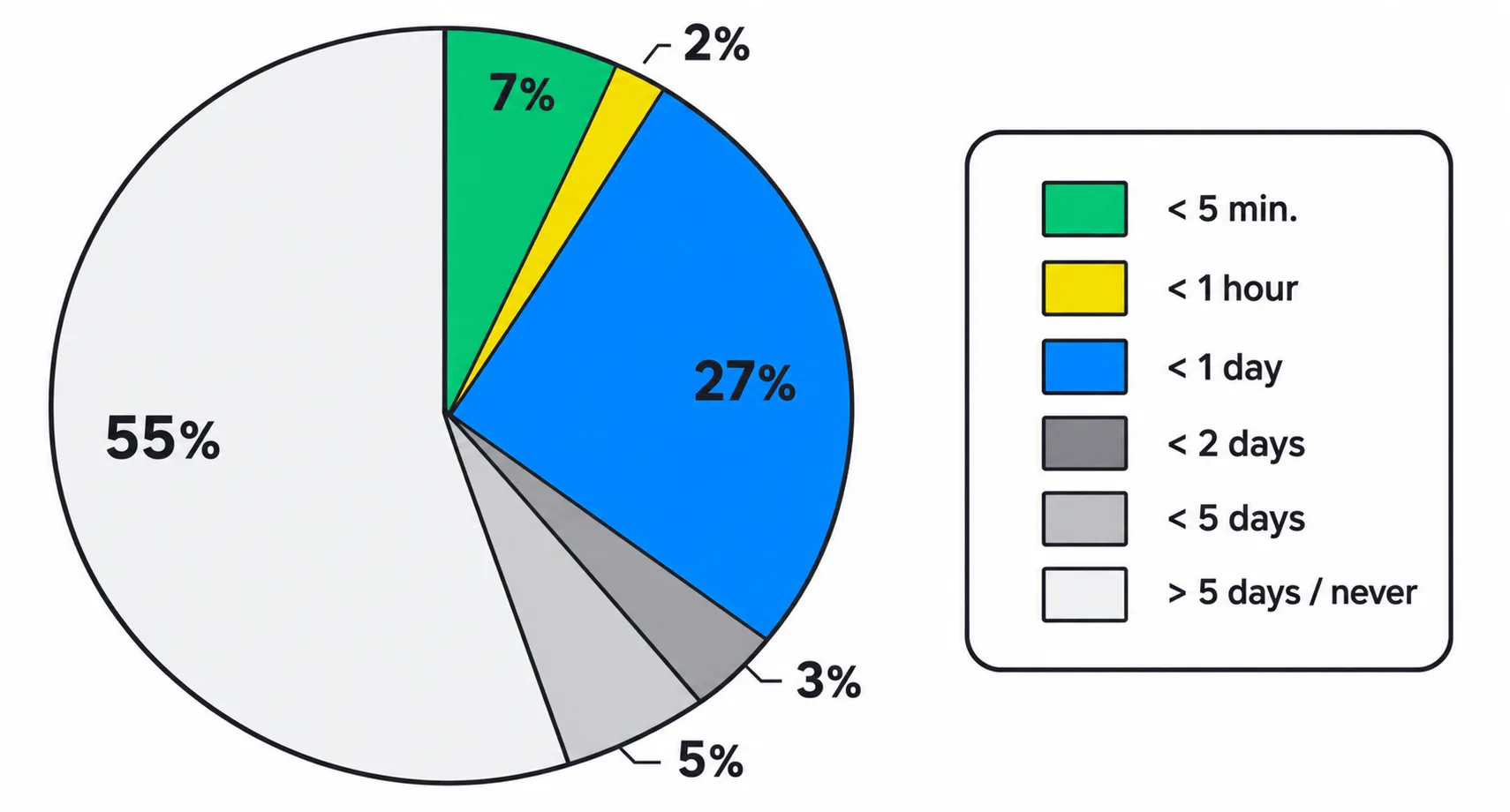
B2B companies fare no better: in a test of 433 companies, only 7% replied within 5 minutes, and 55% never replied even within five business days.
The clearest example is real estate, where speed decides everything. In a 2024 secret-shop of 25+ agencies, 47% of online inquiries got no reply at all, and the median response was 39 minutes. A separate 2025 test of the 74 largest brokerages found that 41% never responded.
Here’s the through-line worth saying out loud: the tools changed, the speed didn’t.
- 2011 — 23% don’t reply;
- 2024 — 47% ignored in real estate;
- 2025 — 41% at top brokerages.
CRMs, chatbots, and auto-responders arrived — and leads kept drowning in silence just as before. Because the problem isn’t the tools. The problem is that nobody can see it.
Why your CRM doesn’t show you this
Ask a manager how fast their team replies and they’ll give you a number off the top of their head or from the “average report.” And they’ll almost certainly be wrong in their own favor. Here’s why.
- The “average” lies. A lead came in at 11:40 p.m. and got answered at 9:10 the next morning — the system logs “9 hours,” even though during business hours the team replies in three minutes. A few overnight and weekend leads like that, and the average turns to mush you can’t make a single decision on.
- “Replied” doesn’t mean “replied on time.” Your CRM shows there was contact on a deal — but not how long the customer waited for the first touch or whether you hit your standard. And those very minutes decide whether the lead stays with you or goes to whoever called back sooner.
- Control after the fact isn’t control. You can pull a report at the end of the week, but by then the lead has long gone cold. For speed to move sales, you have to react before the inquiry goes stale, not perform autopsies every Friday.
What to measure — and how it looks in Kommo
The right metric sounds dull, but it’s the one that changes everything: time to first touch, counted in business hours, per rep and per channel, against a set threshold. The threshold is your speed standard: how many minutes you get to reply once a deal becomes someone’s responsibility.
This is exactly what our SLA First Touch Control widget for Kommo does — let’s be honest, it’s our product. It puts a timer on the first touch (a call, message, email, or note) and counts it in business seconds only: outside the work window and on weekends the timer pauses, so a lead that lands at 6 p.m. on Friday won’t “burn” its SLA over the weekend. The default threshold is 30 minutes, set to your industry standard.
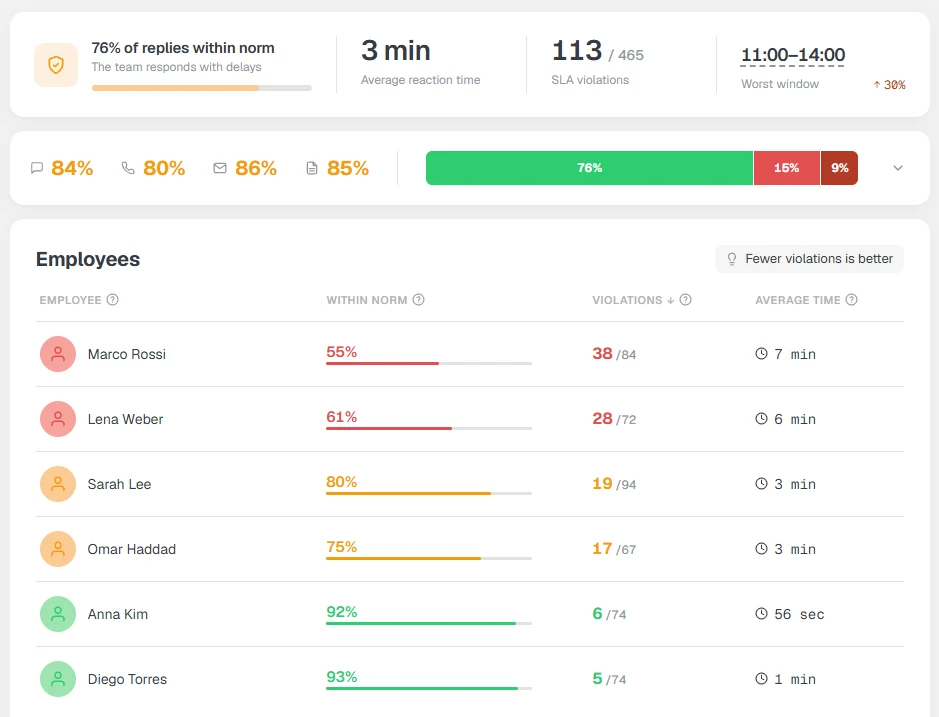
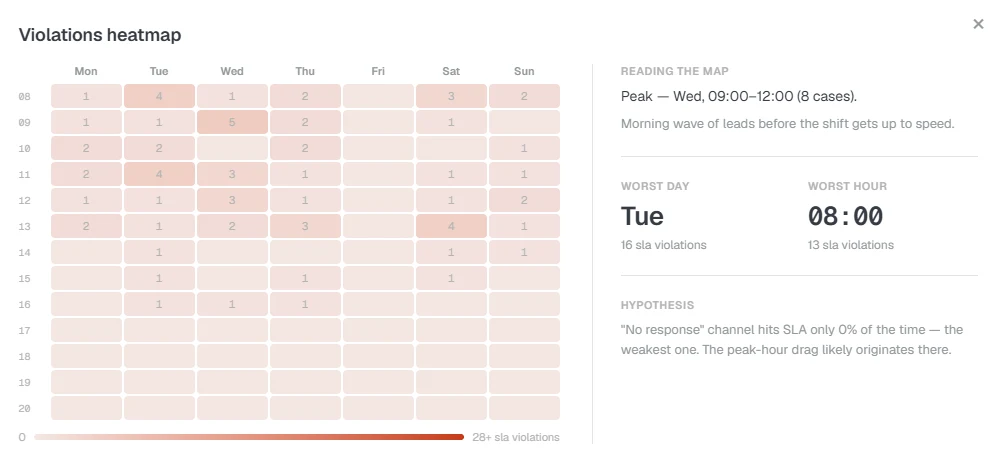
The key thing: it reacts before the breach, not after. A preventive notification arrives while there’s still time to make it; a periodic breach digest and a daily report go to Telegram (say, at 12:00 and 17:00). And a click on any segment — a channel, a speed bucket, a rep’s row — opens the exact list of deals behind the number: you can jump into the deal and message the owner. This isn’t a “call counter,” it’s a layer of visibility and speed control.
Who needs this most
Lead response time doesn’t matter equally to everyone. It’s critical where a customer with one need reaches out to several places at once and picks whoever replied first:
- real estate and auto;
- medical and dental clinics;
- online education;
- B2B with demo requests.
If you have a flow of leads and a team of several reps, without an honest timer you’re losing money and don’t know it.
An honest caveat: if you get three inquiries a week and answer them yourself in a minute, you don’t need this control — don’t overcomplicate it. It belongs where flow, multiple reps, and shift work appear — exactly when “reply fast” stops resting on willpower alone.
Bottom line: to grow sales you don’t have to rebuild the funnel — you just have to stop losing leads to silence. Speed turns into money; the “average” lies; and the fix is a timer on first touch plus an alert before the breach. Stop guessing how fast your team replies — put control in place and see for yourself.