 Technical walkthrough · Kommo
How Similar Customers works
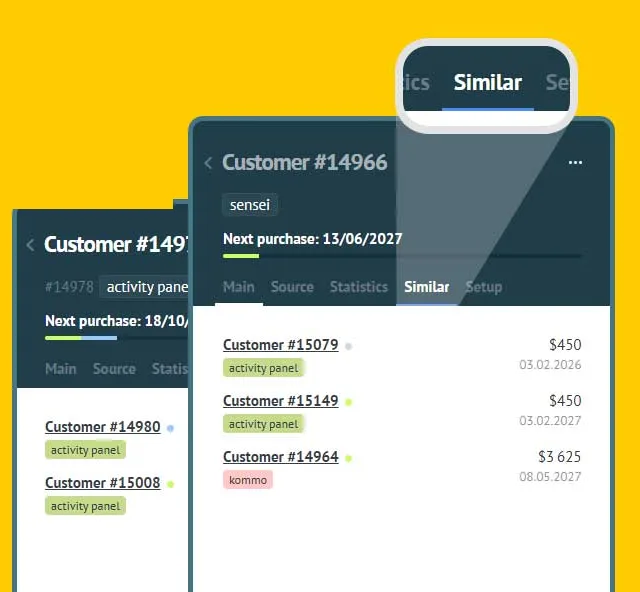
The «Similar» tab in a customer card lists the other cards linked to the same contact. Below: how the integration finds them, what a row shows, when it calls the API and what leaves your account.
What the integration does
Similar Customers adds a «Similar» tab to the customer card. It lists the other customer cards that share a contact with the one you have open. The same person can sit in several cards: a second subscription, a repeat purchase, a payment made for a colleague. The integration gathers them in one place and links to each.
It writes nothing into your CRM: no notes, no tags, no fields, no links. It only reads — the card, its contacts, and the cards found through them.
What a row shows
Every card found is one row, and all five things in it come from Kommo itself.
- Card name — a link that opens that customer card. A card with no name reads «Unnamed».
- Status dot — colour and label come from your account’s customer statuses, so the dot matches what the native tab shows.
- Tags, as pills. A colour you assigned in Kommo is taken literally; a tag without one gets a colour derived from its name.
- Next purchase amount — the same field the card itself prints, in your account currency and with its symbol.
- Next purchase date.
When there is nothing to show, the tab says so — «No other customers share these contacts», «This customer has no contacts yet» — instead of leaving an empty pane.
How it finds the similar ones
The search is three consecutive requests to the Kommo API. No loops over the API, nothing extra.
- The open customer card → its contacts.
- Those contacts → the customer cards linked to each of them.
- The cards found → their names.
The third request is there because nested links carry no name: a measurement on a live account on 28 August 2026 returned 54 links, and not one of them came with a name. Without that request the list would read «Unnamed» all the way down.
The requests go from the browser straight to your Kommo API, on the same address as the account itself. The integration has no server of its own, so your cards never travel through someone else’s machine.
How the tab lives in the card
The «Similar» tab sits before the last tab of the card — «Setup» — and stays visible. When the card column is narrowed and the tabs stop fitting, Kommo moves the extra ones into the «…» menu; the integration keeps its own in the row. The tab is the whole product: hidden away, it simply would not be found.
While our tab is open, the content of the others is hidden; on the way back Kommo shows what it would have shown anyway. The integration does not rewrite the state of Kommo’s own tabs.
The look is borrowed from your account
No colours or sizes of our own — the palette is inherited from Kommo, so dark theme works by itself and the list reads as a native part of the card. The one place a colour is chosen by the integration is the tag pills, and there it carries meaning.
When it calls the API
Data loads the first time the tab is opened, not on every card view. Opening the same card again makes no new requests.
On top of that there is a background prefetch: 1.2 seconds after a card is opened the integration runs the search itself, so the tab opens already filled.
What leaves your account
Your clients’ data does not leave Kommo. Cards, contacts, amounts, dates and tags are read in the browser and shown there — none of it is sent anywhere.
Only service information reaches our server, and only to register the installation and keep the licence:
- the account subdomain, name and interface language;
- the Kommo plan name and the date it is paid until;
- the list of active users: name, work email, admin flag.
Nothing else is sent anywhere.
Requirements, languages and price
What Kommo has to provide
The Customers section, enabled. Nothing else: no webhooks, no write permissions, no configuration after installation. All the integration needs is to read.
Languages
Six: English, Spanish, Portuguese, Russian, Turkish and Indonesian. The tab label and the messages arrive in each user’s own interface language, not in the language the account was registered in — two colleagues in one account may see the tab named differently, and that is correct.
Price
The integration is free: no plans, no payment wired up, no cap on users or cards.
Where to get it
From the Kommo marketplace, or with the button below.
Installation
- 1Press the install button.
- 2Grant access to your account.
- 3In the settings window that opens, press «Save» — without it Kommo does not treat the integration as activated.
- 4Open any customer card: a «Similar» tab appears in the row.
Other integrations
All integrations >RegionTime: client local time
The client’s local time, region and time zone from the phone number — with DST, weekends and holidays.
Advanced Fields
Group fields, turn toggles into convenient controls, add measurement units.
Peresmenka
Manager shift management and automatic deal distribution. Even workload, real-time stats.
Mass Lead Creator
Bulk-creates deals for calling from selected contacts. Tasks scheduled within working hours.
Workspace Diagnostics
Automatic CRM health audit: pipelines, deals, tasks, activity — with AI recommendations.
Questions about the integration?
Leave a request — we'll help with installation, setup, and picking the right widgets for your Kommo CRM process.
on messengers