 Technical walkthrough · Kommo CRM
How qrzaps works
How a click on a WhatsApp link finds its lead in the CRM, which fields get filled, and why we sometimes write nothing at all. For people who already got the idea and want the details.
What it is for
qrzaps answers the question WhatsApp refuses to answer: which ad brought this customer. Someone taps your link on Instagram, on your site or on a printed QR code, WhatsApp opens — and the trail ends there. A lead lands in the CRM with no source, and the budget gets split blind.
The integration closes that gap: a click on a qrzaps link and the first conversation in Kommo are tied together, so utm_source, utm_medium, utm_campaign and the rest land on the lead card — the very fields Kommo's own source reports already read.
How it works
The mechanism rests on one simple trick: a short ticket number, unique per click, is added to the prefilled message.
- The click. Someone opens your
qrzaps.com/w/XXXXXXlink. We record the click with everything it carries: source, campaign, device, country, referring page. - The insert. WhatsApp opens with your text and one extra line: "Ticket no.: 74-185231". Every click gets its own.
- The message. The customer sends that first message as it is — number included.
- The match. Kommo creates the lead, the integration reads the first message, finds the number and asks qrzaps which click it belongs to.
- The write. That click's tags go onto the lead. On a live cabinet, message to filled fields takes about ten seconds.
wa.me click never reveals the visitor's phone number, and WhatsApp passes neither referrer nor link parameters to the CRM. The one thing that survives the jump into the messenger is the text of the message. So the key lives in the text.The number looks like a real support reference rather than a random #a1b2c3 — which is exactly why people rarely delete it. Eight digits: seven random, one check digit.
What lands on the lead
The integration writes into Kommo's own UTM fields, not private copies of them: those are what the native source reports read, along with any other integration already set up in the cabinet.
utm_source,utm_medium,utm_campaign,utm_content,utm_term— the link's tags;utm_referrer— the page the click came from;- "Attribution match" — the one field of our own: by ticket or by time window.
On top of that: a note in the lead feed authored by qrzaps (source, campaign, link) and a service tag qrzaps-attributed you can filter by. Both can be switched off in settings.
Accuracy: three outcomes instead of guesses
Attribution is either exact or harmful. We separate three cases and show which one fired.
- By ticket — the number was found in the message. This is the bulk of it and an exact hit: one specific click, one specific campaign.
- By time window — the customer wiped the text, but exactly one click happened in the minutes before the lead. A fallback, switched on in settings.
- Nothing — no number, and several clicks in the window. The fields stay empty.
A number in the message that belongs to none of your clicks is simply ignored: the lookup only ever runs inside your own account, so a stranger's order number or phone cannot collide with it.
Links and tags
Links are created in the qrzaps.com/app dashboard: the WhatsApp number, the ready message and a label for yourself. UTM tags are built right there, with presets for Google Ads and Facebook so nobody types parameters by hand.
Every link has a QR code (for shop windows, packaging, business cards) and a switch: when a campaign ends, the number stops opening the chat while the link and all its stats stay.
The language of the ticket line
The line with the number is read by your customer, not by you. So its language is chosen separately from the interface language: "Ticket no.", "Protocolo", "N.º de solicitud" or "Номер обращения".
The default is set once on the Kommo tab in the dashboard, and any link can override it. Before a link is created you see the exact line that will travel with the message.
What the reports show
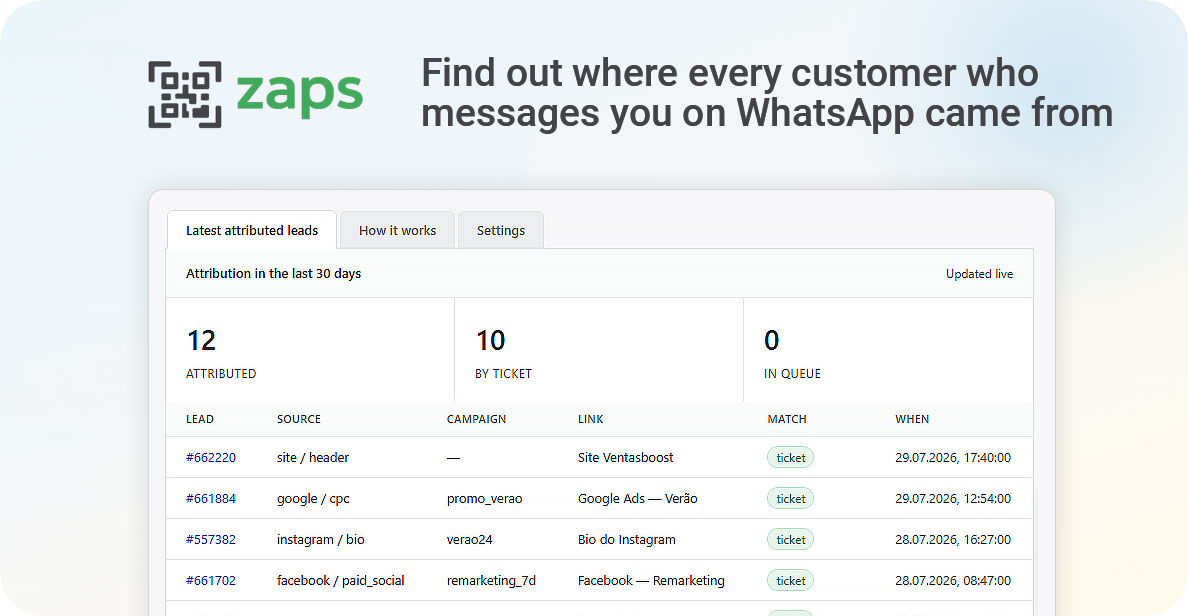
Inside Kommo — the integration's own tab: how many leads were attributed in 30 days, how many of them by ticket, how many are queued, plus the latest attributed leads linking straight to their cards.
In the qrzaps dashboard — per-link stats: clicks per day, sources, devices and countries, every click line by line, and a CSV export. In the link list, next to the clicks, you see how many of them reached the CRM — that is the link's conversion into a real conversation.
What it does not do
The honest limits, so nobody waits for the impossible.
- It does not catch 100% of conversations. Some people delete the whole text before sending; some entry points (a QR scanned on desktop, certain iOS versions) drop the prefilled text. Those leads stay without a source rather than with an invented one.
- It does not follow the conversation. It reads the first message to find the number, and its interest in the dialogue ends there.
- It does not replace end-to-end analytics. It answers "where did this lead come from", not "what did the campaign earn" — the second is counted in the CRM, on the deals themselves.
Installation
- 1Install straight from the qrzaps dashboard with the "Connect Kommo" button. The account links itself — no key to copy.
- 2Or install from the Kommo marketplace and then paste the API key from your qrzaps dashboard into the integration settings.
- 3Done: from that moment your links start carrying the ticket number and new leads start arriving with their source.
Other integrations
All integrations >RegionTime: client local time
The client’s local time, region and time zone from the phone number — with DST, weekends and holidays.
Advanced Fields
Group fields, turn toggles into convenient controls, add measurement units.
Peresmenka
Manager shift management and automatic deal distribution. Even workload, real-time stats.
Mass Lead Creator
Bulk-creates deals for calling from selected contacts. Tasks scheduled within working hours.
Workspace Diagnostics
Automatic CRM health audit: pipelines, deals, tasks, activity — with AI recommendations.
Questions about the integration?
Leave a request — we'll help with installation, setup, and picking the right widgets for your Kommo CRM process.
on messengers