 Technical walk-through · Kommo
How RegionTime works
Where the time zone comes from, what happens at a daylight-saving change, how working and non-working hours are decided, what the widget writes into the card, and how the field for bots stays current. For readers who have the idea and want the detail.
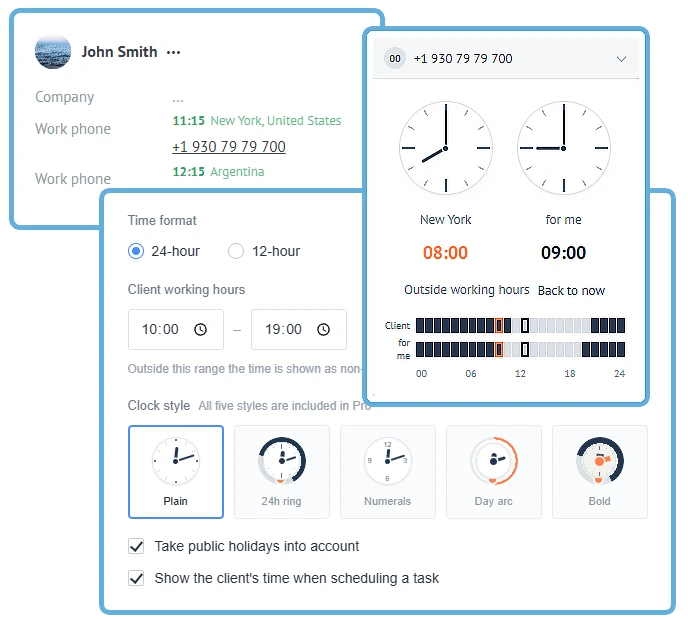
What the widget does
RegionTime takes the phone number from the card and answers one question: what time is it where this person is, and are they at work. The answer appears above the number, in a block of its own in the card, and when a task is scheduled.
The calculation runs in the browser. The numbering and time-zone tables ship inside the widget, so the time appears together with the card instead of waiting on a server. The widget only calls us for settings, the plan and the CRM fields.
How a number becomes a time zone
The widget reads the number by prefix, not by country as a whole.
- Countries with several zones — the United States, Brazil, Australia, Mexico, Russia, Kazakhstan — resolve by the region of the number. A country average would be wrong for most of the map.
- The data is the numbering plan from Google’s open libphonenumber dataset plus the IANA time-zone database. Russia additionally uses the Rossvyaz registry, where the DEF and ABC prefixes are mapped to federal subjects and those to zones.
- When the prefix says nothing. Mobile numbers in many countries carry no region at all. The widget then shows the country and marks the answer approximate — in italics, with a dashed border. That is honest precision, not a failure.
Daylight saving
The widget stores zone names — America/Chicago, Europe/Madrid — not a ready-made offset in hours. The offset is computed for the date in question, every time.
The difference shows exactly where it is usually missed: a task set in October for November is calculated on November’s time, not today’s. Half of Europe and the Americas move by an hour at the end of October, and the widget knows it.
A snowflake may appear beside the time. It means this zone observes a change and is currently on standard time. Where no change exists — which is most of the world — the snowflake never appears.
How working and non-working is decided
It is not only “does the hour fall inside the window”. The widget distinguishes four states and colours the time accordingly.
- Working hours — green. Inside the window, not a weekend, not a holiday.
- The day is ending — amber. The last 30 minutes of the window: still callable, but not for anything long.
- Outside hours — coral, with a moon.
- Weekend or holiday — coral too, with a different icon, so the reason is visible.
The window is 10:00–19:00 by default and changes in the settings. It applies to the client’s local time, not yours.
Holidays and weekends
Weekends
Saturday and Sunday is not a universal rule. In Saudi Arabia, the UAE, Israel and elsewhere the weekend falls on other days, and the widget takes it from the country’s data rather than from habit.
Holidays
The calendar is built from rules, not from a list of dates for one year: fixed dates, Easter and Orthodox Easter with their movable derivatives, constructions like “the third Monday of January”. So the table does not expire on New Year’s Eve.
Manual correction, and why it wins
A number does not always match a place: people move, carry a SIM with them, keep a number registered in another region.
The correction is marked as manual and survives re-resolution: when the number changes or the card is opened again, automatic detection does not overwrite it. The other way round — an algorithm erasing a person’s decision — would mean the mistake could never be fixed.
Fields in the CRM card
The widget creates a field group of its own — “Region” — and puts only its own fields in it:
RTZ_TIMEZONE— the time zone in IANA form;RTZ_REGION— the region or city;RTZ_COUNTRY— the country;RTZ_WORKING—workingoroff(PRO).
Where to create them — lead, contact, company — is chosen separately, and they need not be created at all. Your fields, statuses, tags and notes are untouched.
The field for bots, and how it stays current
“Client working hours” is the only thing that has to be recomputed continuously, and the only thing charged for.
The server does not sweep the base on a timer. For each record it works out the moment the answer next changes — when the client’s working day starts or ends — and wakes only for it. Records whose moment has come are updated in batches: the CRM accepts up to 250 entities per request.
Hence the arithmetic that makes this possible at all. Each client flips twice a day. A base of 100 000 contacts is roughly 33 batch requests an hour against a limit of 7 requests a second. Sweeping the whole base every hour — which is what this looks like at first glance — would not be.
Where the widget draws
- Above the phone number — the time, the region and the colour of the state. No border and no fill: the card field is already outlined, and a box inside it would read as a button.
- A block in the right-hand column — two dials, the day as a strip, and a converter: drag the client’s dial to see what a given hour is for you.
- In the task planner — the client’s time for the chosen slot, before the task is saved.
The widget watches for the card being redrawn and puts its elements back when the CRM rebuilds the markup.
What the widget does with data
- The zone is resolved in the browser. The phone number is not sent anywhere for it.
- The server stores the account id, the settings, the entity-to-zone mapping, and the digits of the number — needed to recompute the working-hours flag without calling the CRM.
- Access tokens are stored encrypted and refreshed an hour before they expire. If access is revoked the widget says so in the notification centre rather than falling silent.
- Colleagues’ time zones are not collected by default: a time zone is coarse location data about a person, and collecting it should be a deliberate choice.
Plans and requirements
What the free plan includes
Everything a person reads: time and region above the number, the block with dials and the converter, the hint in the planner, the fields for zone, region and country, daylight saving, weekends and holidays, manual correction. Forever, with no limit on the number of managers.
What PRO adds
The “Client working hours” field, which the server keeps current, and five clock styles. $15 a month for the whole account, whatever the headcount.
What the CRM needs
Nothing special for what is drawn on screen — it works on any plan. The working-hours field is updated over webhooks, which are not available on every Kommo plan. If yours does not have them, the rest still works.
Installation
- 1Press the install button or find “RegionTime” in the Kommo marketplace.
- 2Authorise the widget — grant access to your account.
- 3Open any card with a number from another region. The time appears above it straight away; there is nothing to configure.
Other integrations
All integrations >Advanced Fields
Group fields, turn toggles into convenient controls, add measurement units.
Peresmenka
Manager shift management and automatic deal distribution. Even workload, real-time stats.
Mass Lead Creator
Bulk-creates deals for calling from selected contacts. Tasks scheduled within working hours.
Workspace Diagnostics
Automatic CRM health audit: pipelines, deals, tasks, activity — with AI recommendations.
Questions about the integration?
Leave a request — we'll help with installation, setup, and picking the right widgets for your Kommo CRM process.
on messengers