Free guide · 5 lessons

How to add
an AI agent to Kommo
from Meta verification to deals in your CRM

  • Why AI in Kommo fails for most teams — and what to do differently
  • Connecting to Kommo and official WhatsApp through Meta — step by step
  • Context, boundaries and handoff to a manager — so the agent doesn't stall
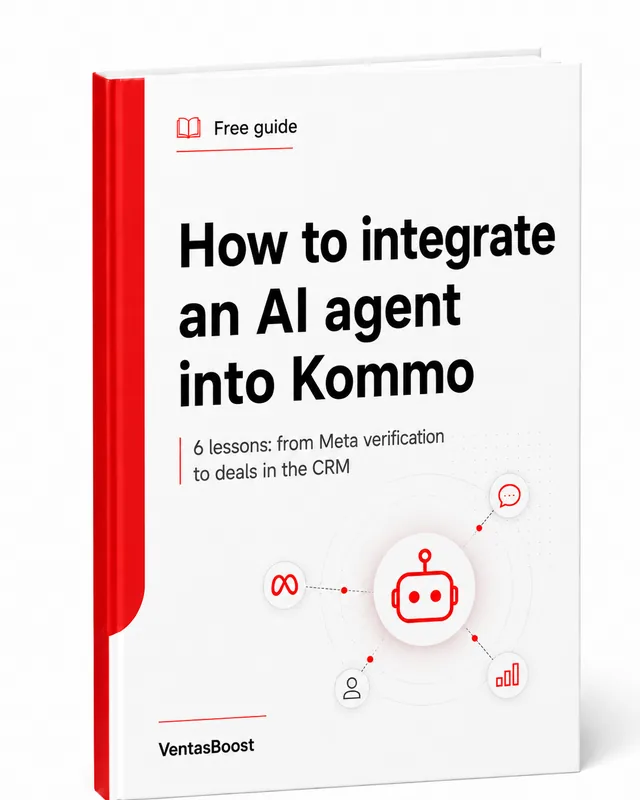
Guide cover: How to add an AI agent to Kommo
Get the guide free

5 lessons to the messenger you prefer — from Meta verification to deals in Kommo.

Get the guide free →

≈2 minutes to sign up · no credit card · unsubscribe anytime

What the guide covers

Five lessons take you from idea to a working agent

This is not a tour of what AI can do. Each lesson closes one practical knot where implementation usually gets stuck. Use the guide as a plan for setting it up yourself, the basis for a spec, or a checklist for your contractor.

01
Why AI should move the deal

How an agent differs from a chatbot and which part of the sale is actually worth handing to it.

02
How to connect AI to Kommo

How to link the model to messages, the deal card, stages, fields, tasks and assigned reps.

03
How to pass Meta verification

What to prepare, how to check your data, connect official WhatsApp and what to do if you're rejected.

04
How to give the agent context and language

Which messages, fields and documents it needs to answer accurately and work across languages.

05
How to launch and measure the result

Test scenarios, quality control, metrics and gradually expanding automation.

Get the guide free →
Lesson 1 of 5 · the agent's role
In the first lesson:
how to make AI reply
how to teach it to move the deal

You'll learn why a polished answer isn't enough, and which actions turn a plain bot into a participant in the sales process.

The lesson helps you define the agent's job: what it finds out, which data it records, when it changes the stage and the moment it must call in a manager.

Lesson 2 of 5 · connecting to Kommo

How to connect AI to Kommo so it can see the deal and act

In the second lesson you'll walk the whole chain: the customer's message, finding or creating a deal, preparing context, the request to the AI, recording the result and handoff to a manager. Separately — where the business logic should live so that swapping the model doesn't break the process.

Customer WhatsApp
Instagram
Telegram

Writes wherever it's convenient for them.

Sales process Kommo

Holds the deal, stage, fields, tasks and history.

Integration layer Context
routing
control

Builds the request, limits actions, handles errors and handoff to a human.

AI agent ChatGPT
Claude
n8n

Understands the message, replies, qualifies and performs permitted actions.

In the guide this diagram is broken down node by node: what receives the message, where state is stored, what data the AI gets, who checks the answer and how actions flow back into Kommo.

LESSON 2 · WHAT THE CONNECTION DELIVERS

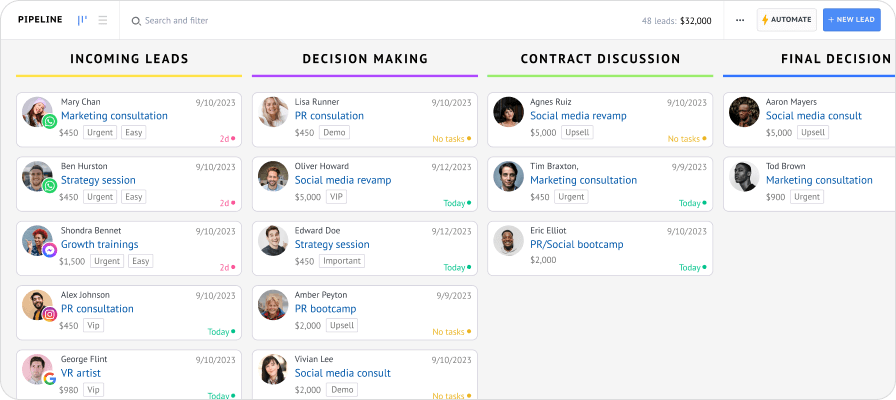
Once connected, every conversation becomes a manageable deal

Using a pipeline as an example, you'll see exactly what should appear in Kommo after the agent replies: the stage, filled-in data, the next step and a clear point for handing off to a human.

Kommo — sales pipeline
Lesson 2 continued · actions in Kommo

In the guide we'll cover which actions you can safely hand to the agent

01Fill in fields

Record the budget, city, dates, the product of interest or any other parameter.

02Change the stage

Move the deal after qualification or the customer's reply.

03Create a task

Schedule a call, a document check or the next contact.

04Assign a manager

Route the customer to the right rep by product, language or region.

05Re-engage the customer

Send an agreed reminder if the conversation went quiet.

Lesson 3 of 5 · WhatsApp and Meta

How to pass Meta verification and connect official WhatsApp

For many teams this isn't a side step but the main barrier. That's why verification gets its own lesson in the guide: from preparing your data to analysing a rejection and re-applying.

The goal of the lesson: not just to get approved status in Meta, but to set up the channel so the number, Kommo and the AI agent can be joined into one working system.

01
Prepare the company and access

Check the business details, website, contacts, accounts and the permissions of whoever runs the setup.

02
Reconcile your data before applying

Clear up any contradictions in your company details so you don't submit the application blind.

03
Connect the official number

Work out which number to use, what happens to your current WhatsApp and how to link the channel to Kommo.

04
Diagnose the rejection instead of blindly re-applying

Identify which node failed the review, fix it and only then submit the application again.

LESSON 4 · CONTEXT
How to give AI context so it doesn't start every conversation from scratch

In the fourth lesson you'll decide which messages, fields, documents and external data the agent actually needs. It can take into account the previous conversation, the chosen product, budget, city, dates, the lead source and questions already asked. So it doesn't restart the conversation or make the customer repeat what they've already said.

The result: the conversation feels like a continuation of dealing with your company, not a fresh encounter with yet another bot.

WhatsAppAnna · deal #4821AI
We looked at the Pro plan yesterday. Would it work for five managers?10:14
Kommo context: Pro plan · 5 users · interested in WhatsApp integration
Yes. The plan works for five managers. Yesterday you also asked about official WhatsApp — it can be connected to the same pipeline. Shall I show you the total price?10:14
Reply built using the earlier conversation and the deal fields
Lesson 5 of 5 · launch and checks

How to test the agent on real scenarios before scaling

01
Situation

A customer writes at night and is ready to choose right now

What the agent does

Replies without a wait, clarifies the key parameter, shows suitable options and records the result in Kommo.

What the business gets

In the morning the manager sees a deal already started and qualified, not an eight-hour-old "still interested?" message.

02
Situation

A lead writes in Portuguese, the team works in English

What the agent does

Understands the message, replies in the customer's language and saves the translation in the deal card for the team.

What the business gets

The company serves a new market without a separate support line and without losing control of the conversation.

03
Situation

The customer went silent after the offer

What the agent does

By a Kommo rule, it sends a fitting reminder that takes the previous conversation into account, and brings the customer who replies back into the pipeline.

What the business gets

Follow-up no longer depends on a manager's memory. A silent customer no longer means an automatically lost deal.

Lesson 5 continued · metrics

Which numbers to record before launch and compare afterwards

The final lesson ends with a measurement table. Before launch you record your baseline numbers, and afterwards you compare the changes in response speed, qualification quality and handoff to a manager.

01First response speed

How long the customer waits before a real conversation begins.

02Share of qualified leads

How many inquiries reach the manager already with the data they need.

03Handoff without losing context

How many conversations the manager has to start over or re-clarify.

Get the 5 free lessons →
Max Shishkin
Who put the guide together

The guide is built on the seams where implementation usually breaks

Sales systems architect · certified Kommo partner

We implement Kommo, integrations and AI agents for companies that sell through chat. In practice the problem is rarely in the model itself. It shows up at the seams: the channel doesn't match the deal, the agent gets no context, actions aren't controlled, and handoff to a manager happens too late.

That's why the guide isn't about prompts or picking the "smartest" AI. It closes five knots in order: the agent's role, Kommo, Meta and WhatsApp, context, launch and measurement.

Don't want to do it yourself?

You don't have to become an integrator to get a working AI agent

The guide is there so you understand the architecture and limits and can tell a working solution from a pretty demo. But you don't have to walk the whole path alone. We can take the build off your hands.

Discuss done-for-you setup
First we run a short discovery call. Then we fix the scope of work, dependencies, timeline and price.
01
We break down your sales process

We decide what the agent should do itself, which data to collect and at which stage to hand the deal to a manager.

02
We prepare Meta and official WhatsApp

We check your data and access, guide the verification, the business account and number connection. The final approval decision is Meta's.

03
We connect AI to Kommo

We link messages, the deal card, fields, stages, tasks and your chosen model or n8n scenario.

04
We set up context and boundaries

We define the knowledge sources, permitted actions, prohibitions, languages and the conditions for handing a conversation to a human.

05
We test and launch

We check real scenarios, fix failures, train the team and record the metrics we'll use to judge the result.

Questions about the guide and implementation

What's worth understanding before you get the lessons

Which businesses is an AI agent in Kommo right for?
It pays off when a company receives a meaningful share of leads in chats, uses Kommo and has a repeatable first part of the sale: clarifying the request, collecting parameters, matching a solution, answering common questions and recording the next step. If almost every request needs a unique expert answer, full automation will be weak.
Does the guide really include a separate lesson on Meta verification?
Yes. It covers preparing your data and access, checking the details before you apply, connecting an official WhatsApp number and what to do if the application is rejected. It is a separate lesson because this is exactly where many projects stall before AI is even connected.
Can I skip doing the whole thing myself and just order the implementation?
Yes. The guide helps you understand what needs to be built and how to judge the quality of the result. But you don't have to study integrations, pass Meta on your own, wire WhatsApp to Kommo and debug the agent yourself. After a short discovery call we can deliver the whole project done-for-you.
What does the done-for-you implementation include?
We break down your sales process, design the agent's role, help with Meta and official WhatsApp, connect your chosen AI to Kommo, set up context, actions and limits, arrange handoff to a manager, test scenarios and support the launch.
Do you handle Meta verification for us?
Yes. We check that your data matches, review access and the state of the business account, prepare the application, guide it through review and help fix the reasons for a rejection. But the final decision is Meta's, so promising guaranteed approval or an exact timeline would be dishonest.
Can I use ChatGPT, Claude, n8n or my own agent?
Yes. The integration layer can connect Kommo to your chosen model, an n8n scenario or your own service. It is best to build the architecture so that business rules do not depend on a single model and it can be swapped out later.
Why not connect AI directly to WhatsApp?
For a narrow FAQ bot that may be enough. A sales agent usually needs the customer's history, the deal stage, fields, tasks, the assigned rep and the ability to hand the conversation to a human. That data and those actions live in the CRM.
Does the agent replace Kommo Salesbot?
Not necessarily. Salesbot is good at fixed rules and sequences. AI helps where you need to understand free-form text. They often work together: automation runs the process, and AI interprets the messages.
What data will the AI see?
Only what it is allowed to receive: selected messages, deal fields, product data, documents or details from external systems. A robust architecture follows the principle of the minimum necessary context.
What can the agent change in Kommo?
That is defined by the project. It can fill in fields, add tags, create tasks, change the stage, assign a rep and send messages. Every action must be explicitly permitted and written to a log.
When does a manager step in?
You define the triggers yourself: the customer is qualified, negotiations have started, special terms are requested, a complaint appears, the answer's confidence is too low or the topic is off-limits for automation. The agent stops and hands over the deal with the full history.
How long does implementation take and how much does it cost?
It depends on the number of channels, the complexity of the logic, external data sources and the actions the agent must perform. After a short discovery call we fix the scope of work, dependencies, timeline and price of the build.
Download the full guide

  • Which work to actually hand to AI — instead of just "adding a bot"
  • Connecting to Kommo, official WhatsApp and Meta — step by step
  • Context, boundaries, handoff to a manager and checking the result
+1

Free · no credit card · unsubscribe anytime.

Don't want to do it yourself?

We'll run the discovery, help you pass Meta, connect official WhatsApp and build your AI agent in Kommo done-for-you.

Discuss implementation