Car-rental inquiries come in around the clock. A customer messages on WhatsApp and asks about availability, dates, price, insurance, the deposit and delivery. To turn that conversation into a booking, a manager has to collect dozens of parameters one by one.
While the manager is busy or asleep, the customer keeps looking. More often than not, the booking goes to the rental that replied first.
For YETI we built not just a chatbot but a purpose-built AI sales system. It receives WhatsApp inquiries, understands the request, walks the customer through the booking process, pulls live vehicle data, checks documents and assembles a ready deal in Kommo CRM.
In this system WhatsApp is only the interface for talking to the customer. The real work happens inside a server architecture that manages AI agents, data, message queues and the state of every deal.
The project in numbers
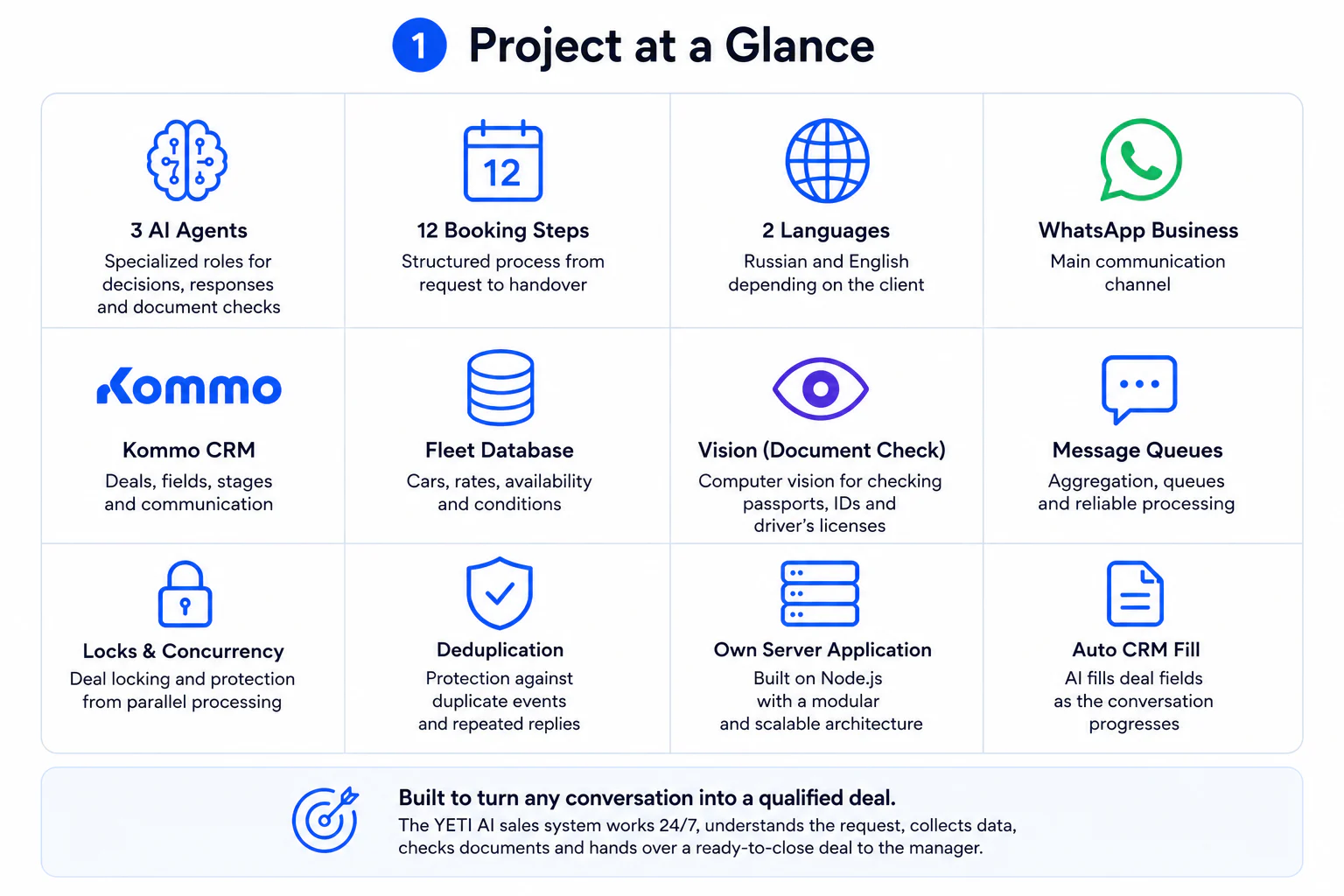
Inside the solution:
- 3 specialized AI agents;
- 12 booking stages;
- WhatsApp Business as the main channel;
- Kommo CRM as the managers' working system;
- a separate database of cars and rates;
- automatic filling of the deal card;
- document recognition with computer vision;
- Russian and English support;
- conversation-context storage;
- incoming-message queues;
- protection against processing one deal in parallel;
- protection against sending duplicate replies;
- our own server application.
The first working version was built on n8n. After the logic had been proven on real conversations, the whole system was moved into a standalone Node.js application.
Why a plain chatbot wasn't enough
From the outside, renting a car can look simple:
But that request isn't enough to offer a specific car and work out the rental terms.
The manager needs to learn:
- the rental city;
- the start date;
- the rental duration;
- the preferred car class;
- a suitable model;
- the insurance type;
- the deposit terms;
- any add-on services;
- how the car will be collected;
- contact details;
- the required documents.
And the customer rarely sends all of it in one message. A typical exchange looks like this:
Need a car
For a week
Something cheap
In Dubai
From next Monday
To a human that's a single thought split across several messages. To a software system it's several separate events that can arrive — and start being processed — at the same time.
So the task wasn't only to teach the AI to answer questions. We had to build a controlled process in which the system:
- understands what the customer has already said;
- determines the current booking stage;
- asks only for the missing data;
- pulls live information from the database;
- writes the result to the CRM;
- hands the conversation to a manager at the right moment.
How the system works
The overall flow looks like this:
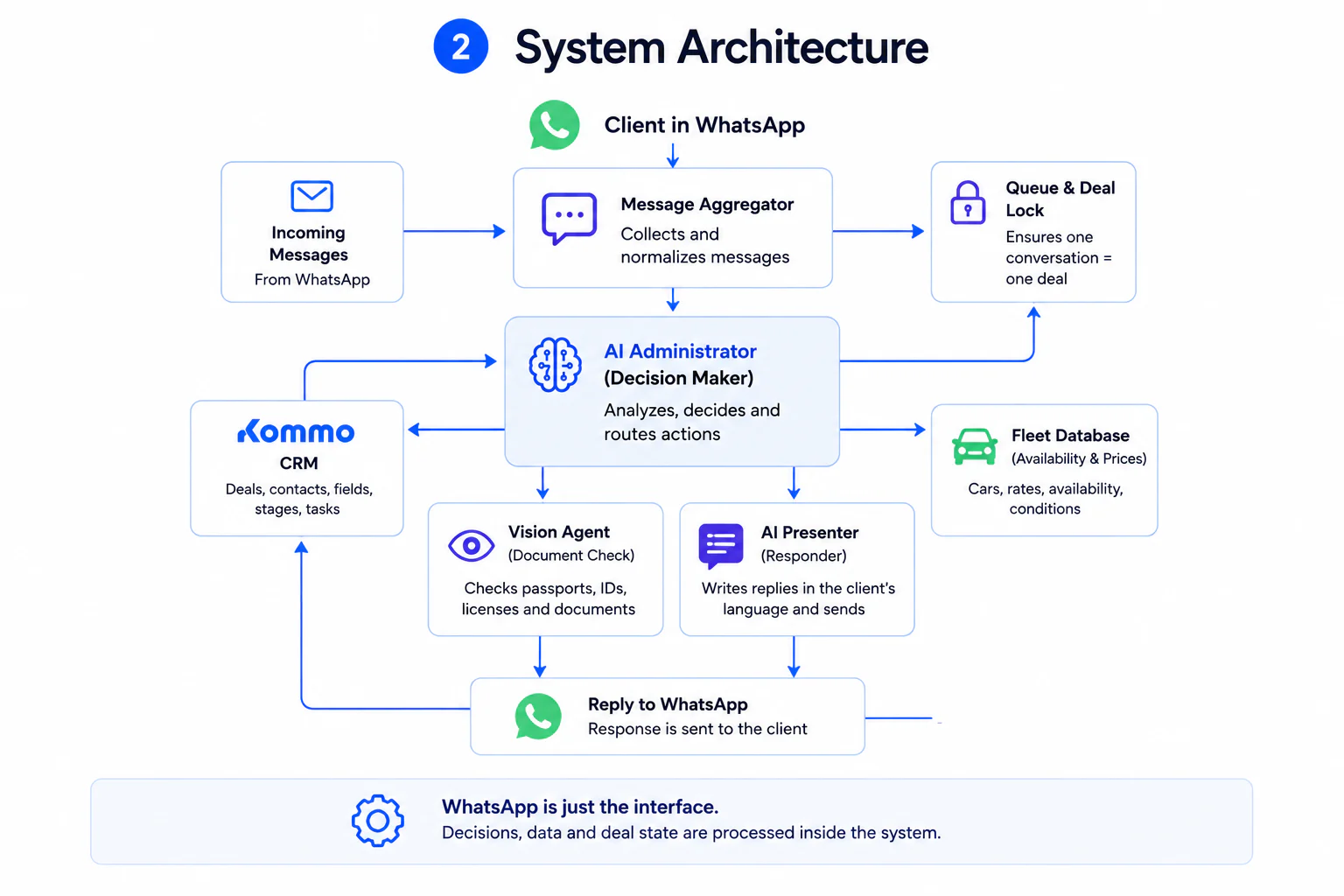
A separate AI agent that analyzes document photos is connected to this process as well.
When a customer writes on WhatsApp, the message is not sent straight to the language model. First the system identifies the customer and the deal, saves the message, checks whether the deal is already being processed, and waits to see if the customer sends a follow-up.
After that, several short messages can be merged into a single request. For example:
Got a car?
For a week
Cheap one
The system hands the AI not four independent events but one assembled thought:
Next the AI administrator analyzes the conversation history, the deal data and the current booking stage. It works out what is already known, what is missing and what action to take next. That can be to:
- ask for the city;
- clarify the date;
- save the rental duration;
- fetch cars from the database;
- show options;
- request a document;
- fill a field in Kommo;
- hand the conversation to a manager.
Then a separate AI presenter phrases the reply to the customer.
Why three AI agents work inside
Early on, you can try to make one model do everything at once: understand the customer, manage the stages, search for cars, make decisions, write replies and check documents.
On long conversations that approach becomes unpredictable. The model can skip data it already has, ask several questions at once, offer a car that doesn't exist, or change the rental terms on its own.
So we split the system into three narrow roles.
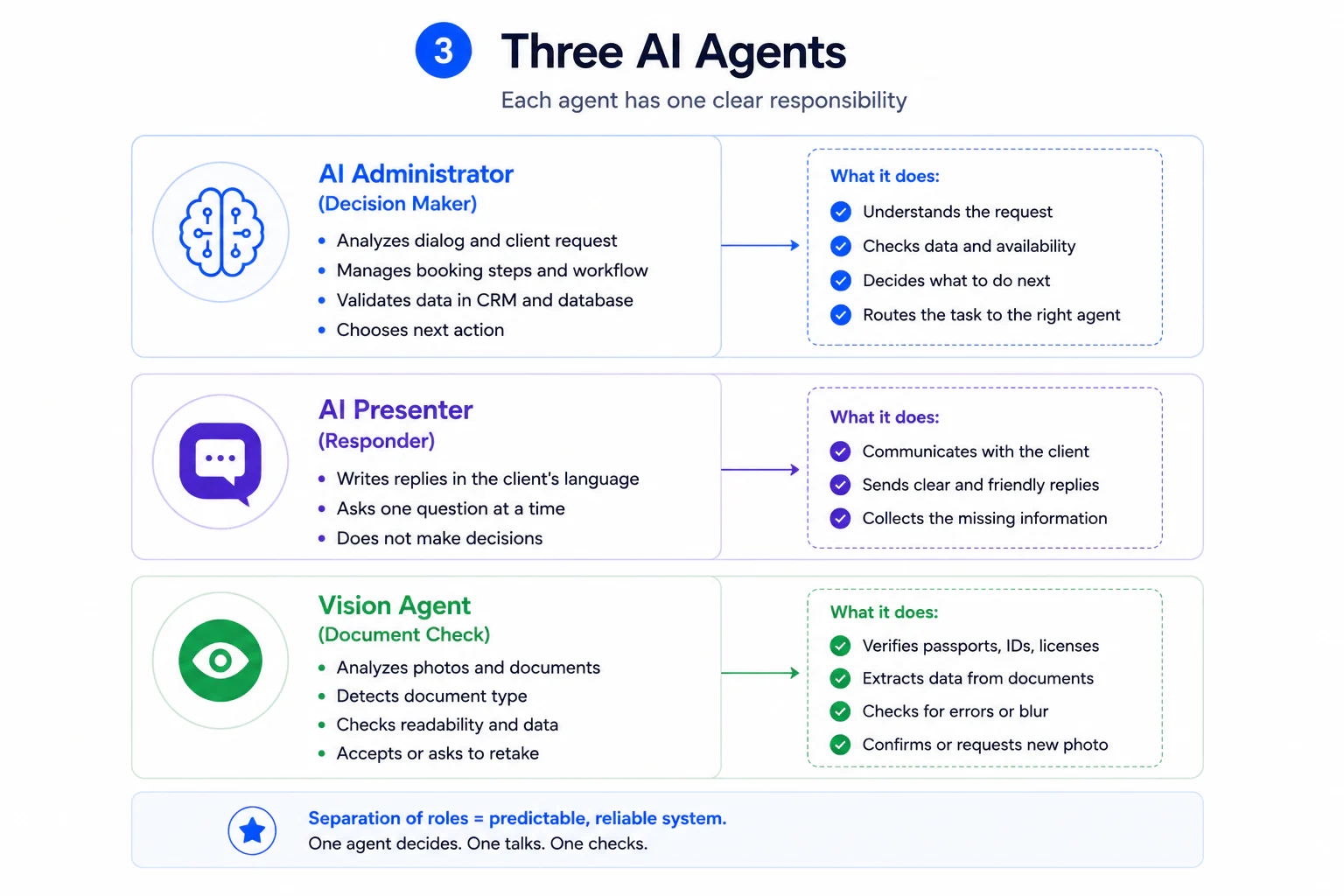
1. The AI administrator
This is the system's controlling agent. It does not talk to the customer directly. Its job is to decide the next action.
The administrator receives:
- the new message;
- the conversation history;
- the Kommo deal-card data;
- the current booking stage;
- the parameters already filled in;
- the available system actions.
After analysis it returns a structured decision:
- which field to save;
- which stage is set now;
- whether there is enough data to search for a car;
- whether to query the database;
- whether to check a document;
- which question to ask;
- whether it's time to hand the deal to a manager.
The administrator is not allowed to invent prices, models or terms. It gets commercial data only from the database.
2. The AI presenter
This is the only agent that writes to the customer. It takes the administrator's ready decision and turns it into a short, natural message in the customer's language.
For example, the administrator decides:
The presenter phrases it:
The presenter's key constraint is one question per message. It doesn't hand the customer an eight-item form or overload the chat. The process reads like a normal conversation with a manager.
3. The document-checking AI agent
This agent kicks in when the customer sends a photo of a document. It analyzes the image and determines:
- whether the file is a document at all;
- what type of document it is;
- whether the photo is legible;
- whether important areas are cropped off;
- whether the process can continue.
The system accepts a passport, an Emirates ID or a driving licence. One suitable document is enough to continue.
The AI does not make the legal call on whether the customer may rent. It only filters out clearly unsuitable images and asks for a new photo if the document can't be read. The final decision stays with the rental's staff.
The 12 booking stages
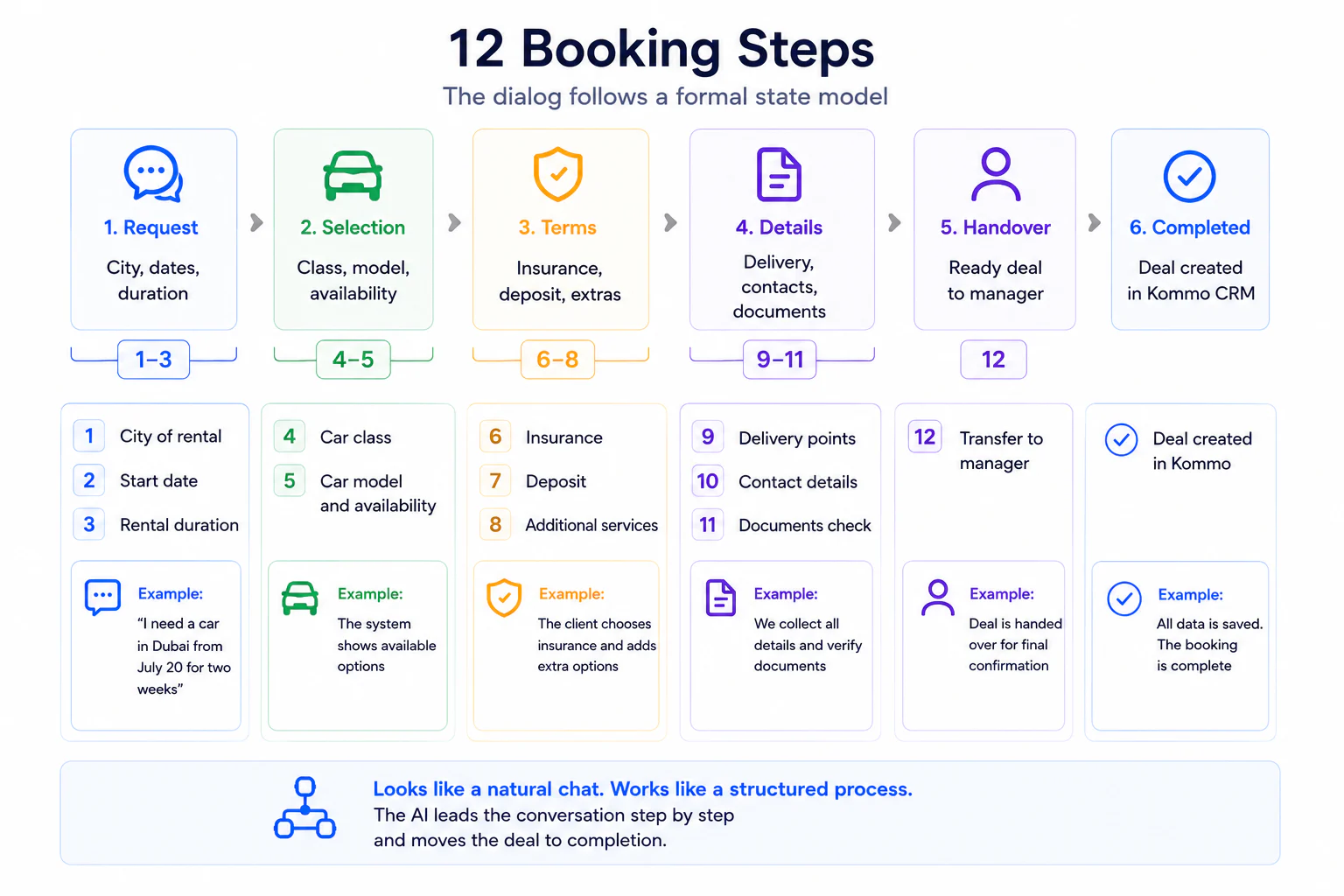
The conversation is built around a formal deal state. The system always knows which stage the customer is at and which data has already been collected. The process has 12 stages:
- Establishing the city, start date and rental duration.
- Choosing the car class.
- Searching available cars.
- Choosing a specific model.
- Choosing insurance.
- Choosing the deposit terms.
- Choosing add-on services.
- Delivery or pickup.
- Confirming the final terms.
- Collecting and checking documents.
- Confirming contact details.
- Handing the deal to a manager and switching the AI off.
Stages don't mean the bot mechanically asks 12 questions in a row. A customer can write straight away:
The system will extract the city, class, date and duration from that message. Those get saved, and the AI won't ask for them again.
Hard gates between stages
Some stages can't be skipped. For instance, the system must not show cars until it knows:
- the city;
- the start date;
- the rental duration;
- the car class.
Without those parameters, availability can't be checked and a price can't be set correctly. So before it queries the database, the system checks the required fields. If one is missing, the AI keeps collecting data.
This mechanism stops the model from "helping the customer" with a made-up answer. The AI doesn't decide which cars exist. It decides which data to ask for, and gets the list of cars from a separate source of truth.
Where the AI gets cars and prices
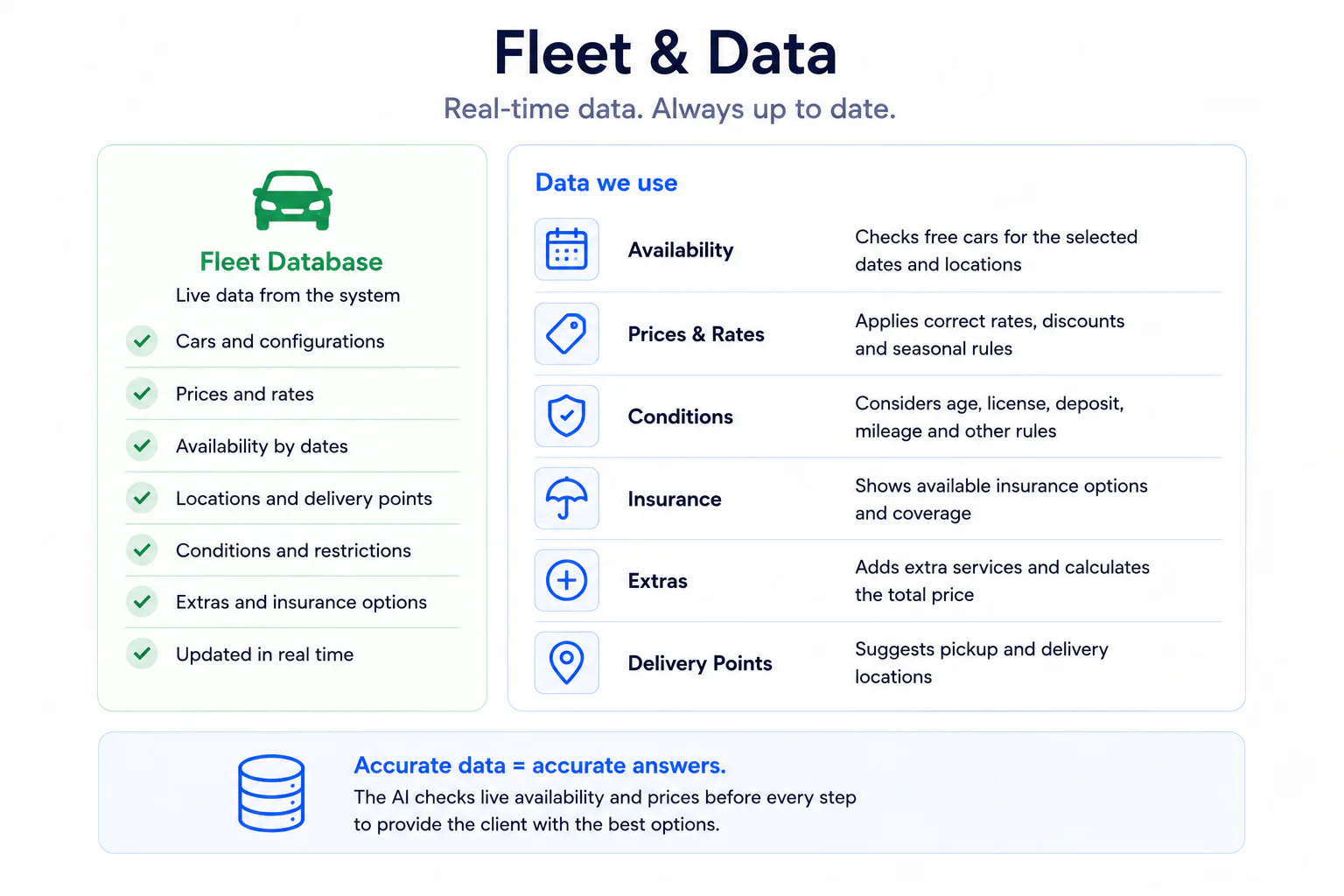
Fleet information is stored separately from the language model. The database holds:
- car models;
- classes;
- cities;
- rates;
- restrictions;
- available options;
- additional terms.
Once the required parameters are collected, the AI administrator calls a server-side search function. The function returns only the cars that match the customer's request. Then the presenter builds a clear offer.
How the data lands in Kommo
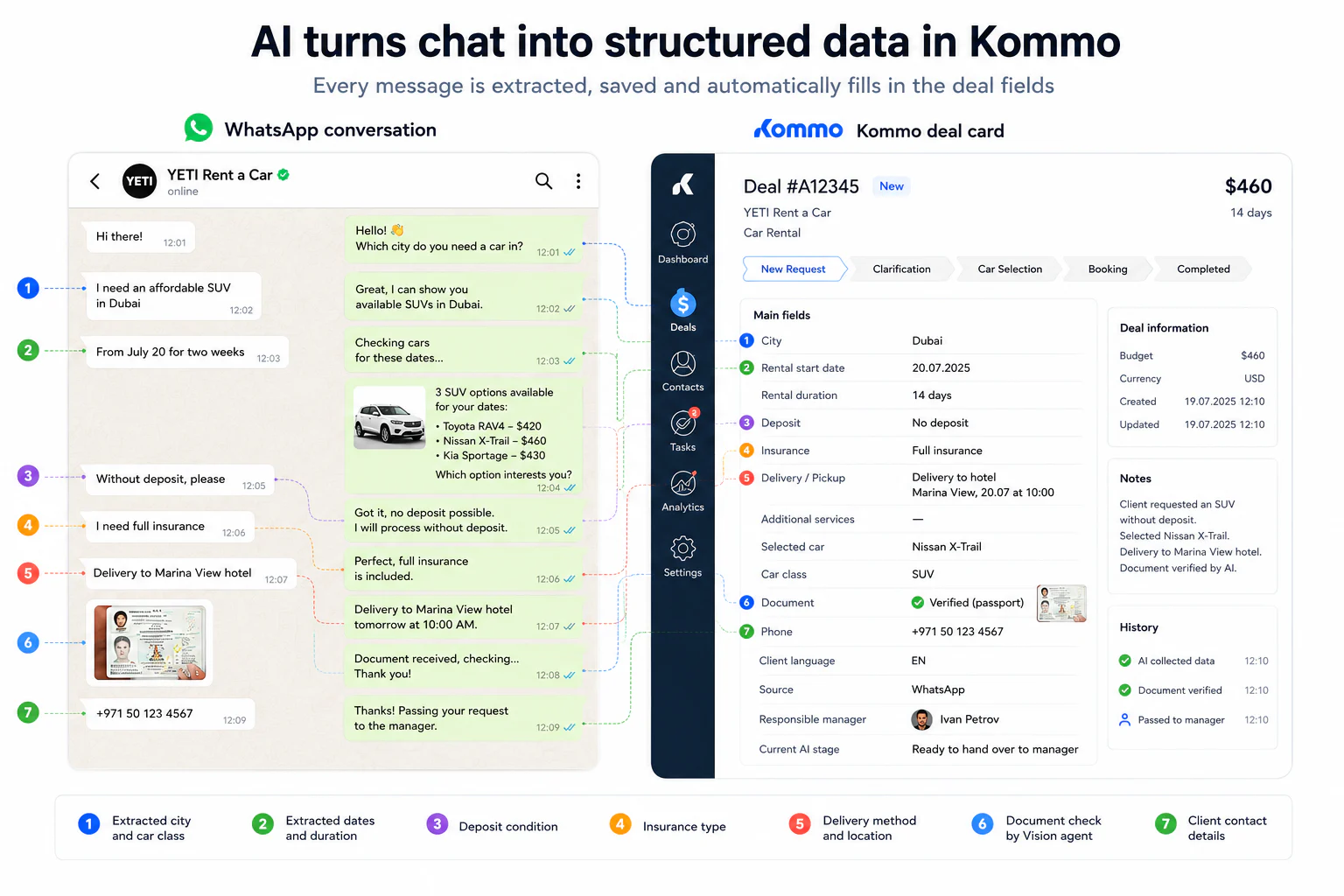
Kommo isn't only where the conversation is stored. As the conversation goes on, the system updates the deal card:
- city;
- rental start date;
- duration;
- chosen class;
- chosen car;
- insurance;
- deposit;
- add-on services;
- collection method;
- document status;
- customer's language;
- current booking stage.
When the AI hands the deal to a manager, the employee doesn't have to reread the whole chat and copy the data over by hand. They get a structured card with the parameters already collected. The conversation stays in Kommo, so the manager can check the context and pick the conversation up from the same place.
The engineering problem the customer never sees
The hardest part of projects like this isn't phrasing the replies. The main problems arise around parallel events, state persistence and keeping several systems in sync.
The customer sends several messages in a row
A person can send four messages in five seconds. If you run the AI on each of them, the system produces several replies in parallel.
So we added an aggregation window. After an incoming message the system pauses briefly. If new messages arrive during that time, they're merged and processed together.
One deal can't be processed in parallel
While the system is composing a reply, the customer may send another message. Without a lock, two processes read the same deal state at once and start changing it. The result can be:
- two replies;
- duplicated actions;
- conflicting field values;
- the wrong booking stage.
To prevent this, the deal is locked for the duration of processing. At any moment only one process handles a given deal. New events wait in the queue.
WhatsApp and the CRM must stay in sync
A message passes through several systems: WhatsApp, the channel, Kommo, the server application, the AI model and the database. Any event can be delivered twice or with a delay. So the system stores the IDs of processed events and, before sending, checks whether that reply has already been produced.
State can't live only in the chat history
The message history matters, but on its own it isn't a reliable deal state. So the following are stored separately:
- the current stage;
- the collected parameters;
- the chosen car;
- the options shown earlier;
- the customer's language;
- the handoff state;
- the document-check result.
The AI receives this structure together with the history, instead of reconstructing the whole process from scratch on every message.
First version: a fast start on n8n
We built the first version of the system on n8n. For prototyping that was the right call. n8n let us quickly connect Kommo, receive messages, call the AI, test prompts, work with the car database, check documents and launch the first real conversations.
That way we tested not a pitch or an abstract concept but the real process on live inquiries. As the project grew, the diagram expanded to roughly a hundred nodes. At that point limits appeared.
Change complexity
A small tweak could touch several branches of the process. Before every edit we had to check that it wouldn't break neighbouring logic.
Queues and locks
A visual builder handles sequential integrations well, but manages parallel messages, locks and re-delivered events less easily. Reliability had to be propped up with extra workaround constructs.
Debugging
When a process is dozens of branches and around a hundred nodes, finding the cause of an error takes longer and longer. You have to work out which branch ran, what data was in each node, whether a second process started, where the state changed and why a particular reply was sent.
Maintenance
The system was already working with real customers. That meant it had to be not just developed but also updated safely. At a certain point the cost of maintaining the visual process grew higher than the cost of moving the logic into code.
n8n did its job: it let us validate the product hypothesis fast. But the production system had outgrown the prototype format.
Migration to our own application
After the business logic was proven, we moved the system into a standalone Node.js server application. The behaviour for the customer stayed the same:
- the same WhatsApp;
- the same conversational style;
- the same stages;
- the same cars;
- the same handoff to a manager.
What changed was the internal architecture. The logic was split into independent modules:
- receiving events;
- message aggregation;
- the processing queue;
- deal locking;
- state storage;
- the AI administrator;
- the AI presenter;
- document checking;
- the Kommo integration;
- working with the car database;
- sending messages;
- error logging.
After the migration, each part can be changed and tested on its own.
Technology stack
The final version uses:
- Node.js — the server runtime;
- Express — receiving incoming events and the HTTP layer;
- Redis — queues, temporary state and locks;
- PostgreSQL — cars, rates and persistent data;
- Kommo API — deals, fields, stages and the conversation;
- WhatsApp Business API — the communication channel;
- OpenAI GPT — conversation analysis and reply generation;
- computer vision (a vision model) — analyzing document images;
- Docker — deploying the services;
- Git — version control for the code and the prompts.
The AI agents' prompts are stored separately from the main application logic and are versioned too. That lets us see which rule was in force at a given moment, compare versions and roll a change back if needed.
How the project evolved
The project went through several successive stages.
- Version 1. Proof of concept. A basic AI answers messages and collects part of the data.
- Version 2. A formal booking process. The conversation is split into stages. A deal state and mandatory transition conditions appear.
- Version 3. Integration with the real fleet. The AI stops offering cars on its own and gets them from the database.
- Version 4. Three specialized agents. Decision-making, reply phrasing and document analysis are separated.
- Version 5. Working with message queues. Message aggregation, deal locks and duplicate protection are added.
- Version 6. Document checking. The system starts analyzing submitted images and asking for a new photo when needed.
- Version 7. Migration off n8n. Once the process was proven, all production logic moved into our own application.
- Version 8. Managed operation. Logging, prompt versioning, error control and the ability to change individual components safely are added.
What we had to rebuild
The project didn't arrive in its final shape at once. Some components we rewrote several times. In particular, we:
- changed the conversation-state storage model;
- reworked handling several messages in a row;
- strengthened protection against parallel replies;
- split one AI's functions across several agents;
- changed the rules for moving between stages;
- reworked the car-selection mechanism;
- moved the logic from n8n into Node.js;
- pulled the prompts out of the process into separate, versioned files.
That's a normal part of building an AI system that works with real customers, not in a demo. The hard part here isn't getting a nice-looking answer from the model. The hard part is making the system's behaviour robust under incomplete data, repeated events, non-standard messages and parallel conversations.
What the system does not do
YETI does not replace the whole sales team. The system deliberately does not do several things.
- It doesn't make the final call on the customer. The AI can check the type and quality of a document photo, but it doesn't decide the legal eligibility to rent.
- It doesn't take payment or hand over the car. Payment, the contract, the final confirmation and handing over the car stay with a person.
- It doesn't invent availability or prices. All commercial data comes from the database.
- It doesn't keep talking after the handoff. Once the deal is ready, the AI goes into a closed mode. From there a human takes over.
- It doesn't try to resolve every dispute on its own. Non-standard situations and sensitive questions go to a person.
The goal of the system isn't to remove people from the process. It's to take the routine part off their hands and pass the manager a customer at the moment a human decision is actually needed.
What changed for the business
After rollout, the way an inquiry is handled became standardized.
- Inquiries are handled around the clock. The first reply no longer depends on the managers' schedule. Overnight inquiries move straight into qualification.
- Data is collected consistently. The system doesn't forget to ask about the date, duration, city, insurance or deposit.
- The manager gets a prepared deal. The main rental parameters are already filled into the Kommo card. The employee joins not at the first message but at a formed request.
- Cars are offered from real availability. The AI doesn't rely on its own knowledge of models and prices — the offer is built on the fleet data.
- The conversation doesn't depend on the manager's language. The system replies in Russian or English depending on the customer's language.
- The architecture can scale. New stages, languages, rules, rates and integrations are added as separate components, not as extensions of one giant script.
We don't publish conversion or revenue growth figures: those belong to the client's internal data. The verifiable result of the project is a working production system that receives inquiries around the clock, walks the customer through a formal process, syncs with the CRM and hands the manager a structured deal.
What it takes to build a system like this
To put AI into a real sales process, connecting a language model to WhatsApp isn't enough. You have to design the whole system in order.
1. Formalize the business process
Describe what the manager should receive, which data is mandatory, in what order to collect it, which stages can't be skipped, and at what point a human steps in.
2. Define your sources of truth
The AI must not invent prices, availability, rates, discounts, terms or commercial conditions. Every kind of data needs a controlled source.
3. Separate decisions from wording
The agent that runs the process and the agent that talks to the customer do different jobs. Separating them makes the system more predictable.
4. Store a formal state
The conversation history alone isn't enough. The deal stage and the collected parameters must be stored separately.
5. Design for parallel processing
Before launch, decide how to merge short messages, how to lock a deal, how to handle repeated events, how to prevent duplicate replies and how to recover the process after an error.
6. Connect the CRM as part of the process
The AI must not only reply but also change the working system: fill fields, move stages, save results, hand off responsibility and switch off after passing to a person.
7. Start with a controlled rollout
Turn the system on for a limited share of conversations first, analyze real chats and adjust the rules.
Bottom line
For YETI we built a purpose-built AI sales system for a car rental. It brings together WhatsApp, Kommo CRM, the car database, three AI agents, computer vision, message queues and server logic.
The customer sees an ordinary WhatsApp conversation. But behind that conversation runs a system that understands the request, manages the booking stages, stores the deal state, pulls live cars, checks documents, fills the CRM, defends against parallel and repeated events, and hands a finished request to a manager.
That's why it's more accurate to call the result an AI sales system, not a bot. The bot here is only the visible part. The real value lives in the architecture that turns a customer's free-form conversation into a managed business process.